Add a white photo border
Add an even white photo border around any picture, or white bars that make it square, and set the width in pixels.
Drop a photo here
or paste it. JPG, PNG, WebP. Several at once is fine.
Never uploaded: it all runs in your browser.

Freeno account, no watermark
Privatefiles stay on your device
3000 pxlargest preset export
Batchmany photos, one ZIP
Your photo with a white border, ready to save
A white photo border is a plain margin around a picture. SquareFitImage draws it as an even frame on every side, or as white bars that make the photo square.
Set the width from 0 to 200 px, pick white or another color, and save. Square posts are one use; you can also post to Instagram without cropping.
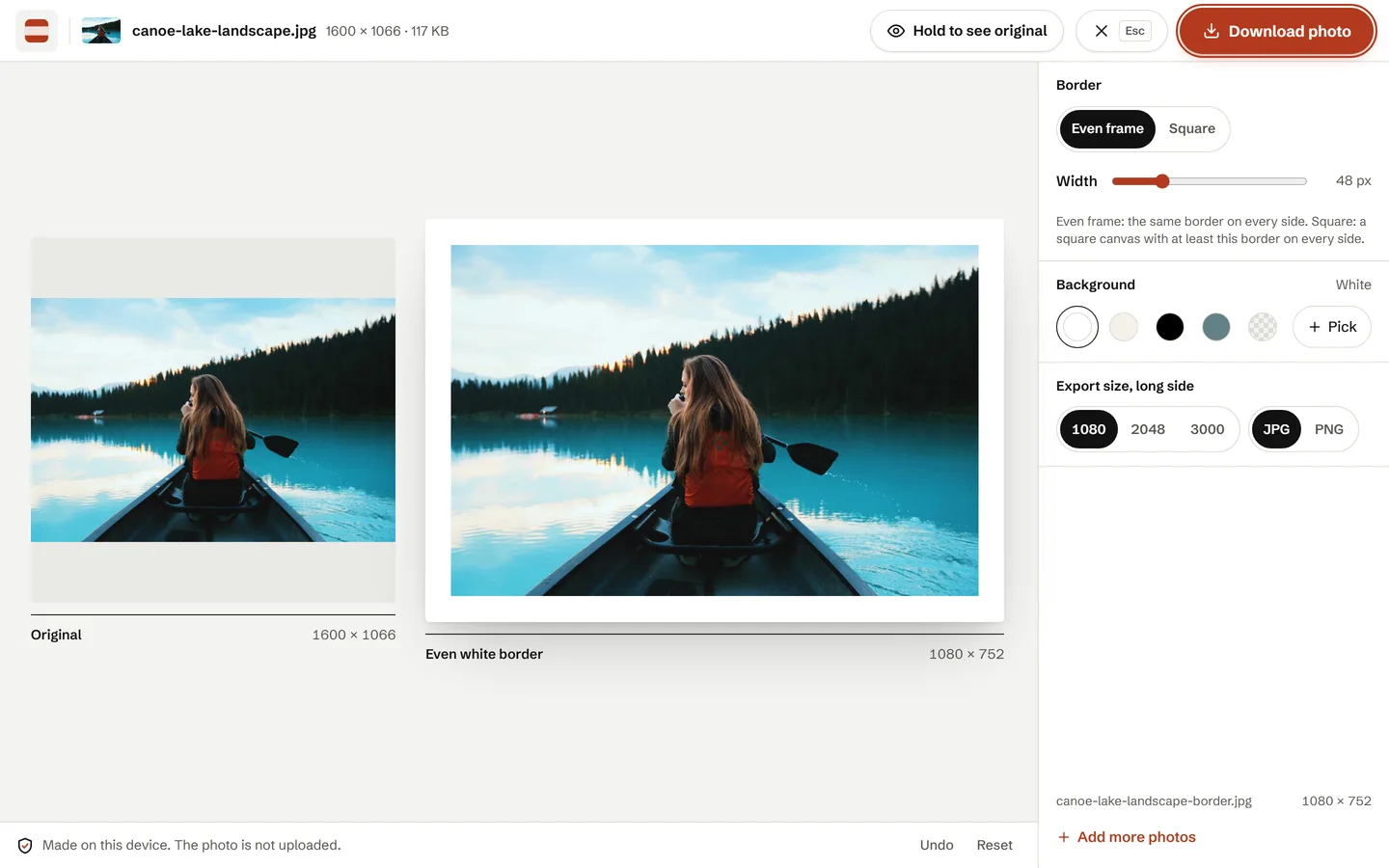
How to add white borders on photos
To add a white border to a photo, choose the photo, pick the border type and width, pick a color, then press Download photo.
Choose the photo
Drop it on the box, paste it, or press Choose photo. Several photos at once are fine. The photo opens in this browser and is never uploaded.
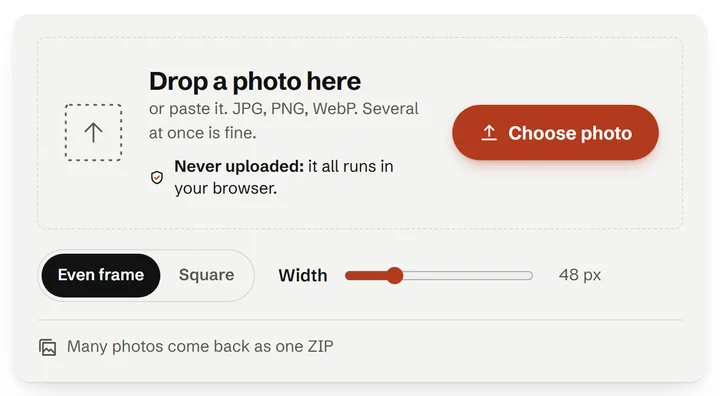
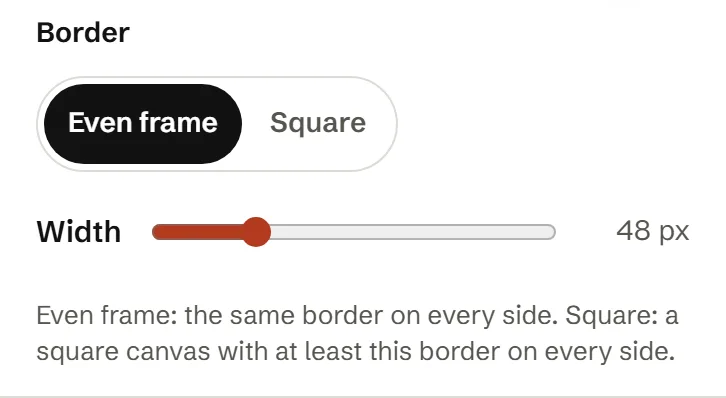
Pick Even frame or Square, then the width
Even frame keeps the photo's shape. Square adds white bars until the canvas is 1:1. The Width slider runs from 0 to 200 px and starts at 48 px.
Pick the border color
White is chosen first. Off-white, black, a color sampled from the photo, Transparent and Pick, for any hex value, sit in the same row.
Choose a size and press Download photo
Pick 1080, 2048, 3000 px or Custom, then JPG or PNG. The file saves with -border added to its name, such as canoe-lake-landscape-border.jpg.
Even frame or square frame: two kinds of white border
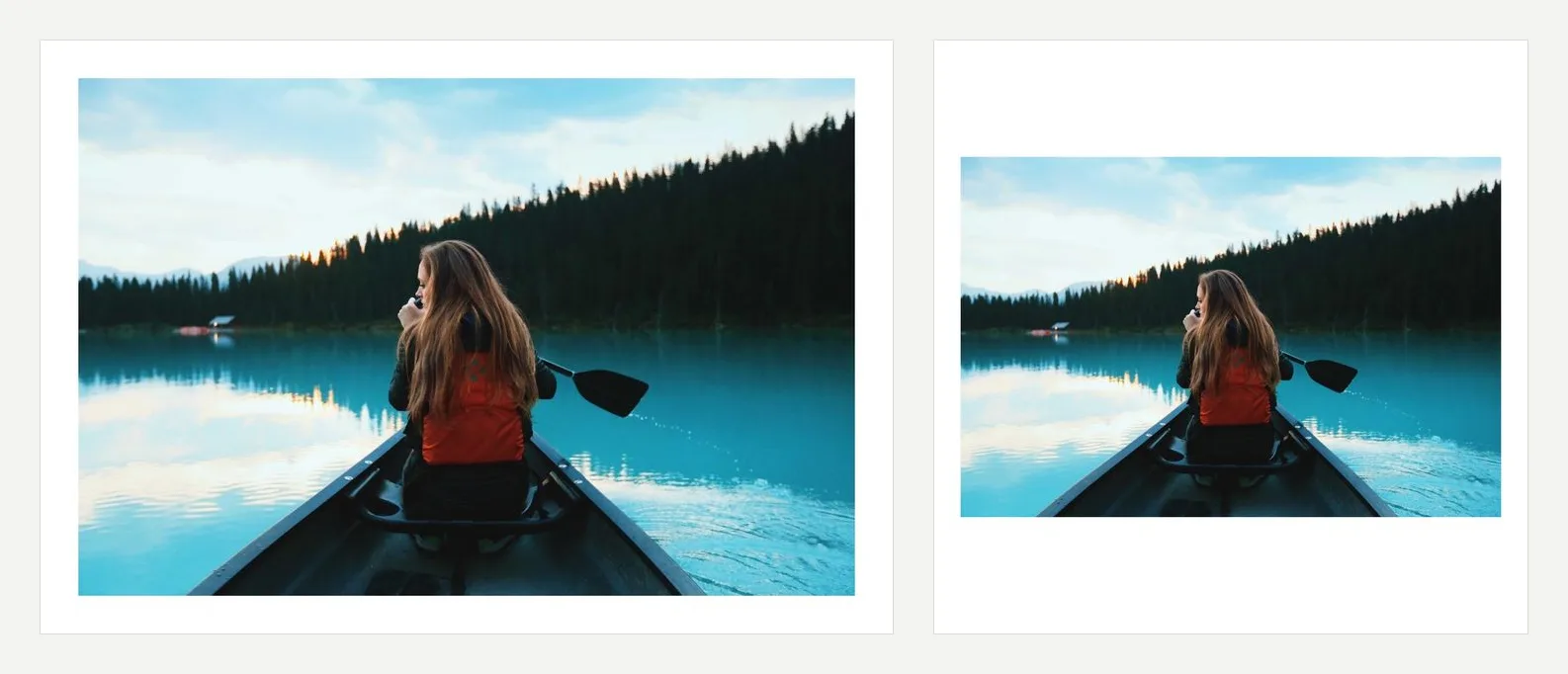
SquareFitImage has 2 kinds of white border. An even frame adds the same width on all four sides, so the photo keeps its shape.
A square frame adds white bars to the short sides until the canvas is 1:1, with at least the chosen width on every side.
Can I add a white border without cropping my image?
Yes, SquareFitImage adds a white border without cropping your image. Both kinds keep every pixel of the photo and scale it to fit inside the border.
In the W3C object-fit definition, this fitting is contain, not cover. When filling the frame matters more, crop to a square instead.
How do I add white space to make a photo square?
To add white space and make a photo square, pick Square, then set the width. The bars on the short sides grow until width and height match.
Width is the smallest margin. A 3:2 photo at 1080 px with 48 px gets 212 px bars above and below, and 48 px at the sides.
- White photo border
- Any plain white margin added around a picture, even on every side or uneven to reach a set shape.
- Mat (picture framing)
- The card with a cut window that sits between a framed print and the glass. An even white frame copies that look in a file.
- Padding: letterbox and pillarbox bars
- Bars added above and below a wide photo are a letterbox. Bars beside a tall photo are a pillarbox.
- Aspect ratio (1:1)
- Width divided by height. A 1:1 image has equal sides, the shape of a square Instagram post.
- Stroke outline
- A thin line between the photo and its border. SquareFitImage doesn't draw one; awhiteborder.com offers it, according to its own page.
How thick should a white border be?
A white border's thickness is a matter of taste. The default 48 px is 4.4% of a 1080 px export, a thin gallery-style edge.
awhiteborder.com suggests 10 to 20% for Instagram. At 1080 px that is 108 to 216 px per side, and 216 px is past the 200 px slider limit.
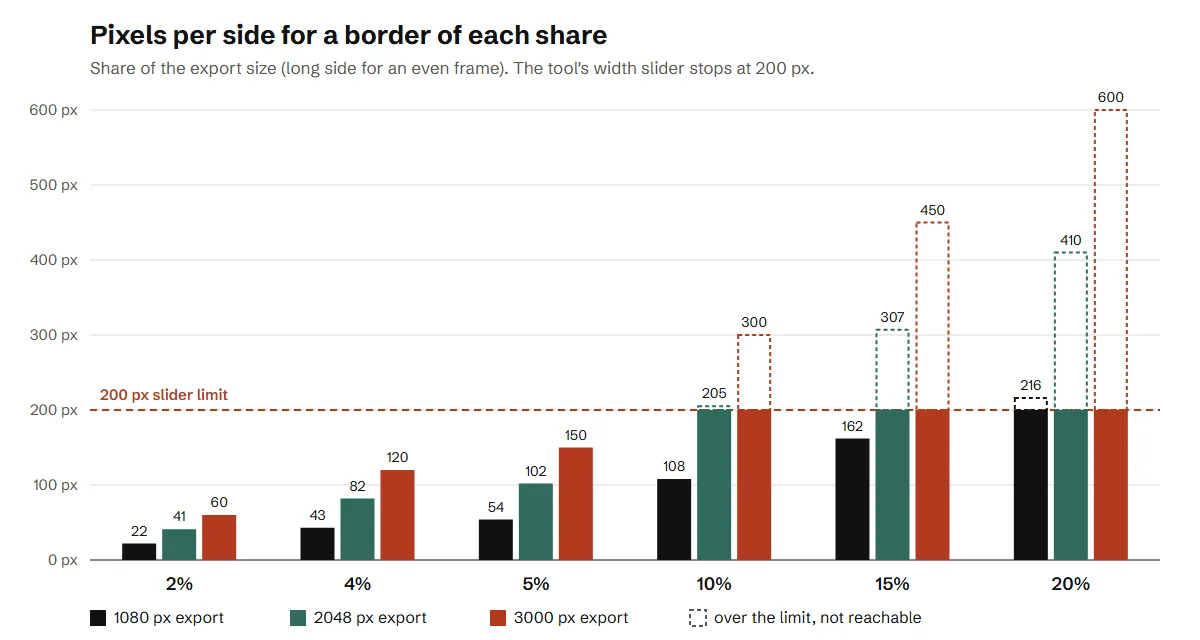
| Border share | 1080 px export | 2048 px export | 3000 px export |
|---|---|---|---|
| 2% | 22 px | 41 px | 60 px |
| 4% | 43 px | 82 px | 120 px |
| 5% | 54 px | 102 px | 150 px |
| 10% | 108 px | 205 px, capped at 200 | 300 px, capped at 200 |
| 15% | 162 px | 307 px, capped at 200 | 450 px, capped at 200 |
| 20% | 216 px, capped at 200 | 410 px, capped at 200 | 600 px, capped at 200 |
How the width turns into pixels
The width is in pixels, not percent, so one setting looks thinner on a bigger export. 48 px is 4.4% at 1080, 2.3% at 2048 and 1.6% at 3000.
For an even frame, the photo's long side is the export size minus twice the width. The short side scales by the same factor, then the border is added back.
Worked example: 1600 × 1066 photo, 1080 px, 48 px. 1080 − 96 = 984. 1066 × 984 ÷ 1600 = 656. The file is 1080 × 752.
White bars that make each photo shape square
A square frame puts the extra space on the short sides. These are the bars on each side, from the same code the editor runs.
| Photo shape | Square, 1080, 0 px | Square, 1080, 48 px | Square, 2048, 48 px | Square, 3000, 48 px | Even frame, 1080, 48 px |
|---|---|---|---|---|---|
| 3:2 camera phototop and bottom | 180 + 180 | 212 + 212 | 373 + 374 | 532 + 532 | 1080 × 752 |
| 4:3 phone phototop and bottom | 135 + 135 | 171 + 171 | 292 + 292 | 411 + 411 | 1080 × 834 |
| 9:16 phone screenleft and right | 236 + 236 | 263 + 263 | 475 + 475 | 683 + 683 | 650 × 1080 |
White, off-white, black or your own color
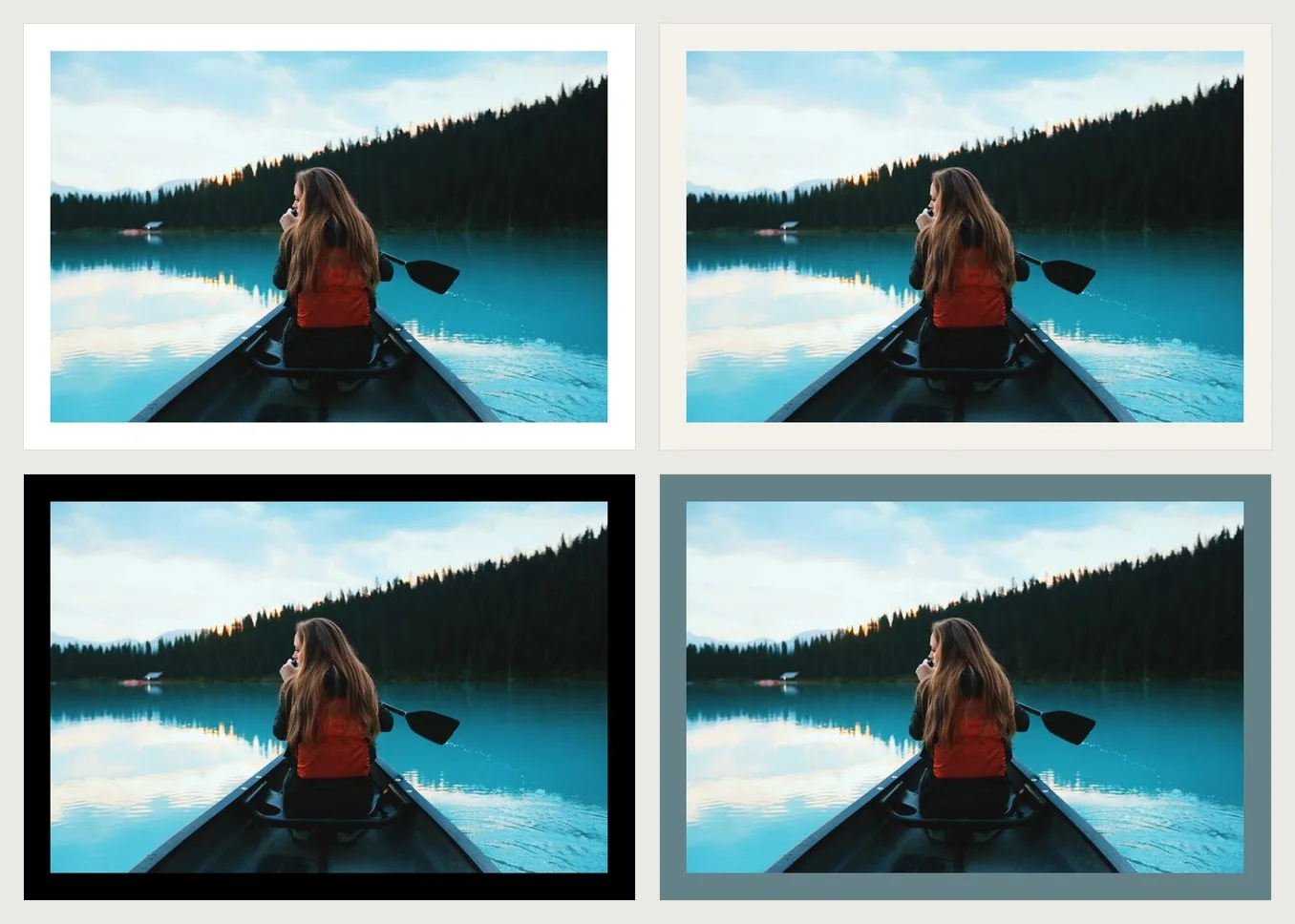
SquareFitImage offers 4 ready border colors: white, off-white (#F4F1EA), black and a color sampled from the photo. Pick sets any other color.
Can I use any color for the border?
Yes, you can use any color for the border. Press Pick, then use the color well or type a hex code such as #638186.
The color is painted with the canvas fillRect method before the photo goes on top. In our test, the four colors changed the file size by under 1 KB.
Transparent and blurred borders
Transparent leaves the border clear and saves a PNG, because JPEG can't store transparency. Blurred photo fills the border with a soft copy of the picture.
For a border made of the photo's own colors, fill the border with blur on the blur border page.
Does a white border shrink or soften your photo?
Yes, a white border shrinks the photo, because the border takes pixels from the export size. At 1080 px with 48 px, the photo is 984 px long.
Softening comes from resizing. A 1600 px photo scaled to 984 px loses fine detail. At 3000 px it is enlarged to 2904 px, which adds pixels but no detail.
| Photo | Original | Even frame, 1080 | Square, 1080 | Even frame, 3000 |
|---|---|---|---|---|
| canoe-lake-landscape.jpg | 1600 × 1066, 117 KB | 1080 × 752, 112 KB | 1080 × 1080, 119 KB | 3000 × 2031, 532 KB |
| coffee-pour-over-landscape.jpg | 1600 × 1066, 132 KB | 1080 × 752, 118 KB | 1080 × 1080, 125 KB | 3000 × 2031, 596 KB |
| mug-product-landscape.jpg | 1600 × 1126, 130 KB | 1080 × 788, 128 KB | 1080 × 1080, 133 KB | 3000 × 2140, 572 KB |
| portrait-sunglasses-landscape.jpg | 1600 × 1066, 98 KB | 1080 × 752, 89 KB | 1080 × 1080, 96 KB | 3000 × 2031, 428 KB |
| portrait-woman-tall.jpg | 1066 × 1600, 112 KB | 752 × 1080, 104 KB | 1080 × 1080, 112 KB | 2031 × 3000, 538 KB |
| pug-blanket-landscape.jpg | 1600 × 1066, 233 KB | 1080 × 752, 192 KB | 1080 × 1080, 200 KB | 3000 × 2031, 947 KB |
| reading-woman-landscape.jpg | 1600 × 1066, 74 KB | 1080 × 752, 74 KB | 1080 × 1080, 81 KB | 3000 × 2031, 361 KB |
| teapot-landscape.jpg | 1600 × 1044, 114 KB | 1080 × 738, 109 KB | 1080 × 1080, 115 KB | 3000 × 1991, 502 KB |
| waterfall-rainbow-landscape.jpg | 1600 × 1066, 166 KB | 1080 × 752, 143 KB | 1080 × 1080, 152 KB | 3000 × 2031, 712 KB |
At 1080 px, each even frame file was 82 to 100% of the original's size. The square version was 4 to 9% larger, since it has more white pixels.
At 3000 px, files were 4.5 to 5.2 times their 1080 px size. Pick 3000 for prints or shops that ask for it, not for posting.
JPEG files are saved again at quality 92, and Exif metadata is dropped.
All 9 test photos are 1600 px Unsplash JPEGs; no HEIC files, film scans or full-size phone photos were in this run.
Border a whole set of photos at once
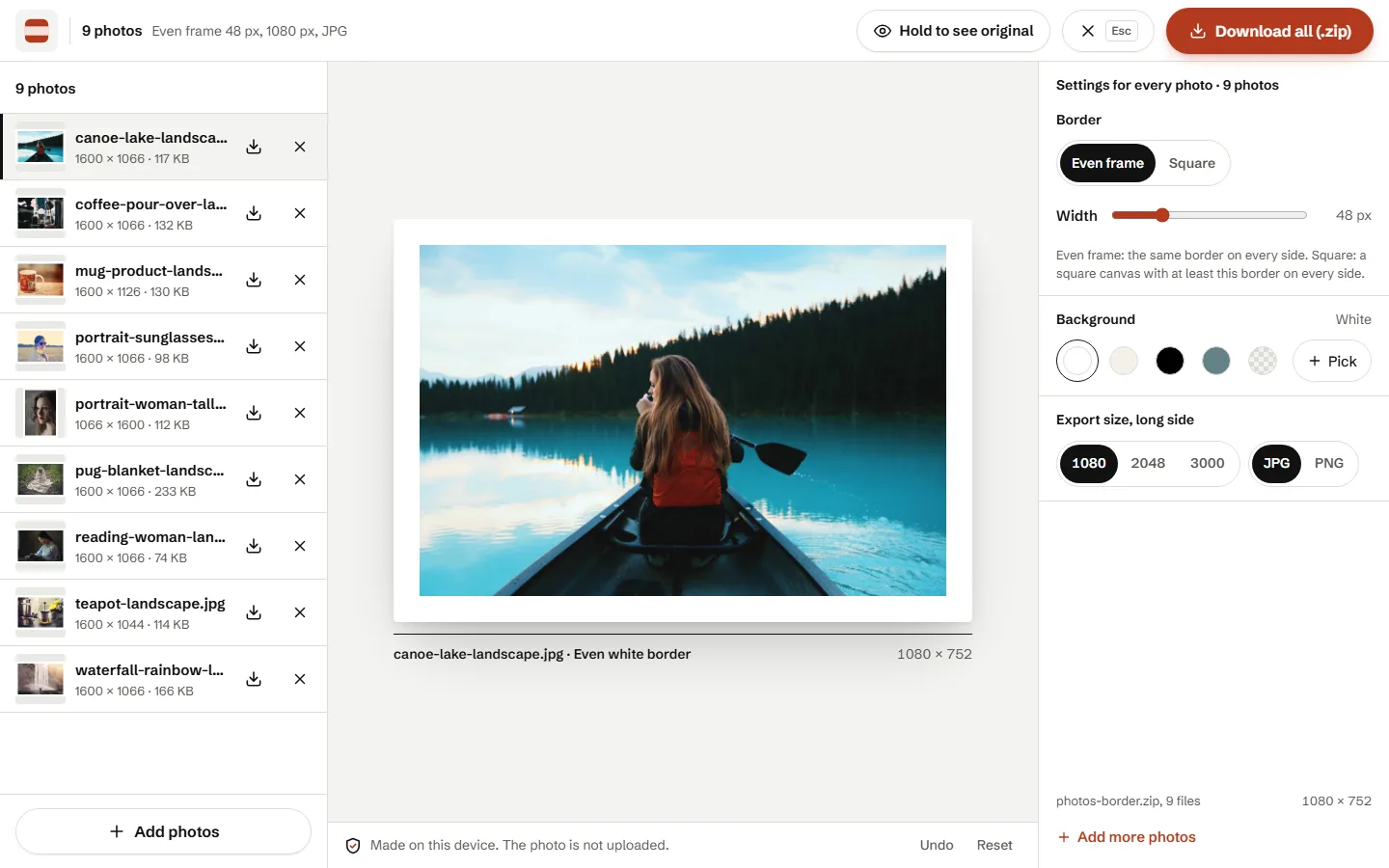
To border a whole set of photos at once, drop up to 30 photos together. The same border, color and size apply to all of them.
Download all (.zip) saves every file in one ZIP. Each photo in the list also has its own download and remove buttons.
In our test, 9 photos at 1080 px with a 48 px frame came back as photos-border.zip, 1.1 MB, with 9 files inside.
White borders for prints and film scans
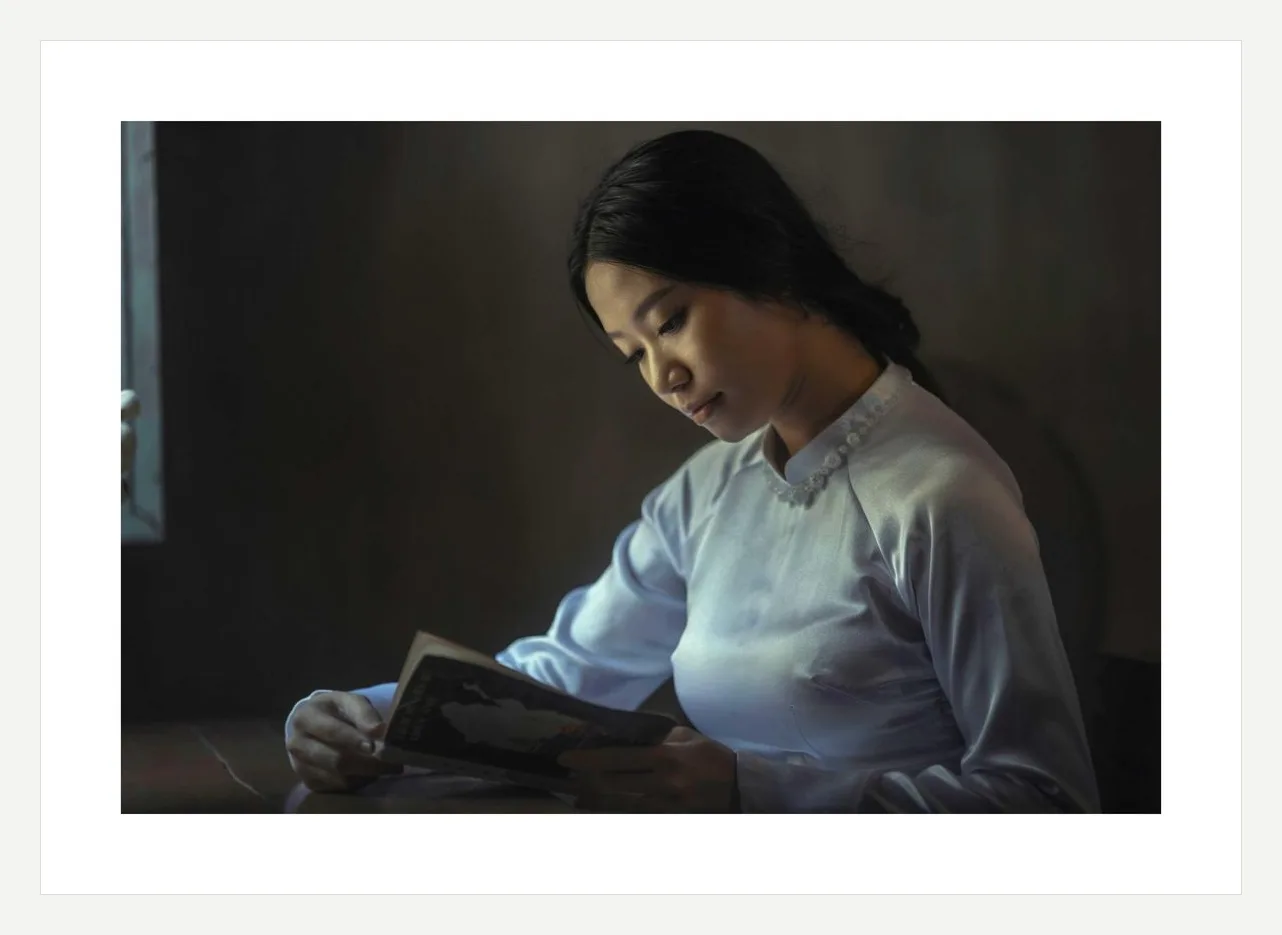
For a print, export an even frame at 3000 px, the largest size, so the white border is part of the file you send to print.
At 3000 px the widest border is 200 px, 6.7% of the long side. Very wide print margins are out of reach of the slider.
Film scans are a common reason to add a frame. We have not run a film scan through the tool yet, so this section shows a camera photo instead.
Instant film (polaroid print effect) frames are wider at the bottom. SquareFitImage draws the same width on every side, so it doesn't copy that look.
Why add white borders to your photos?
People add white borders for 3 reasons: to post a whole wide or tall photo as an Instagram square, to give a set one look, and to leave print margins.
A white border also separates the picture from whatever surrounds it, the job a mat does inside a picture frame.
Add a white border on iPhone or Android
To add a white border on iPhone or Android, open this page in the phone's browser and choose a photo. Nothing needs installing.
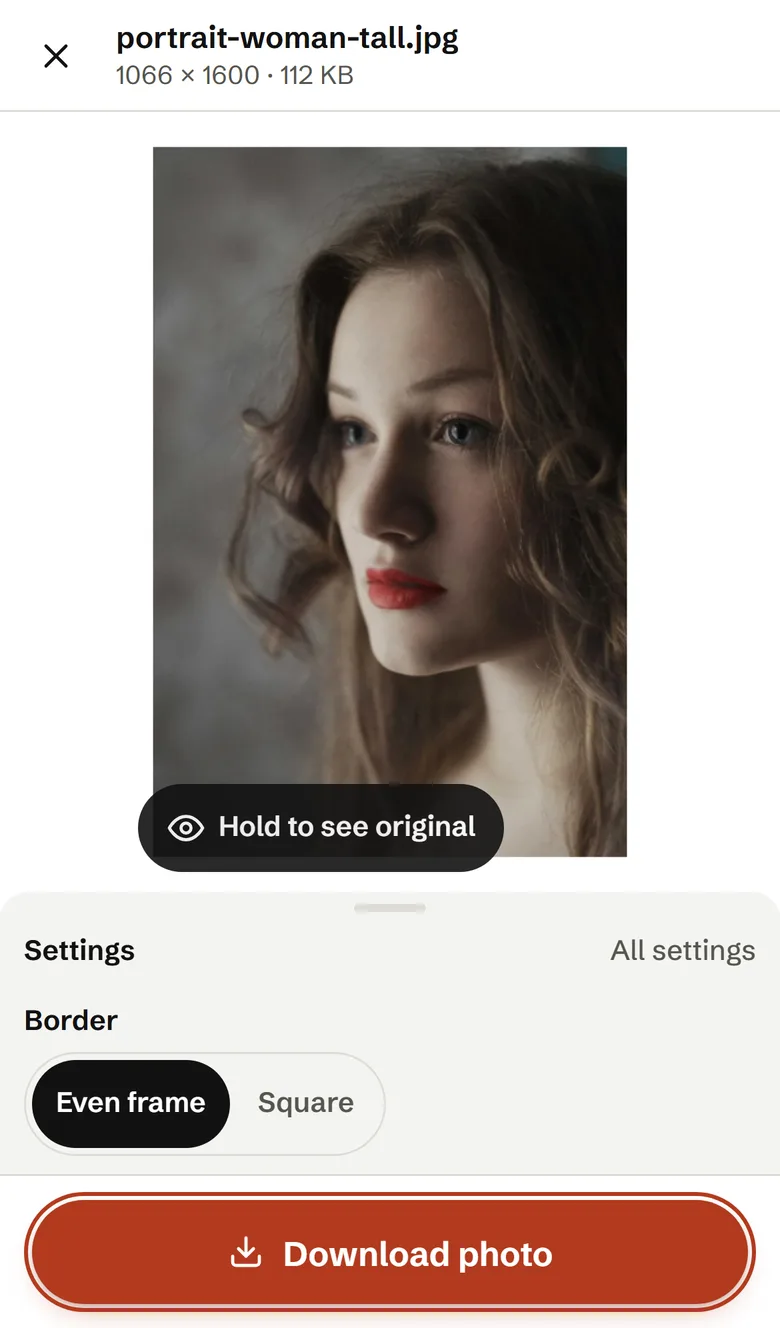
On a narrow screen the editor shows the bordered photo first. A Settings sheet sits below it, and Download photo stays pinned at the bottom.
You can also make a picture square in other apps that have a canvas tool.
How can I add a white border to a photo on iPhone?
On an iPhone, open this page in the browser, choose the photo, set the border, then press Download photo. We have not yet run these steps on a real iPhone.
iPhones can save photos in High Efficiency Image File Format (HEIC). When a browser can't decode a HEIC file, the tool names the file and asks for JPG or PNG.
Your photos never leave your device
Your photos never leave your device here. The border is drawn by the HTML canvas element in your browser, through the Canvas API, and the file is made there.
We logged every request while canoe-lake-landscape.jpg got its border and was saved: 0 POST or PUT requests, and 0 bytes of the photo sent.
The only requests were GETs for the editor's own code, loaded when the first photo was chosen.
Which files you can open and download
SquareFitImage opens JPG, PNG and WebP files up to 100 megapixels, and downloads JPEG or PNG.
JPEG is smaller and suits photos. PNG adds no compression loss and is the only choice for a transparent border.
HEIC and AVIF open only where the browser decodes them. Phone photos stored sideways are turned upright from their Exif orientation before the border is drawn.
The saved file carries no Exif data. All 9 test photos had it, and none of the 36 bordered files kept it.
SquareFitImage, Canva and border apps compared
We ran the same 3 photos through SquareFitImage and addwhiteborder.com on 24 November 2026, at each tool's defaults.
Canva's page blocked our test browser, so the Canva column only quotes Canva's own photo borders page.
| Feature | SquareFitImage | addwhiteborder.com | Canva |
|---|---|---|---|
| Default file, canoe photo | 1080 × 752, even frame | 1778 × 1778, square | Not checked |
| Default file, tall portrait | 752 × 1080, even frame | 1778 × 1778, square | Not checked |
| Border width set in | Pixels, 0 to 200 | Percent, 0 to 50 | Says any width |
| Even frame and square frame | Both | Both, plus 8 other ratios | Not checked |
| Border colors | White, off-white, black, sampled, any hex | Not checked | Says any color |
| Exif kept in the file | No | Yes | Not checked |
| Clicks after choosing the photo | 1 | 2 | Not checked |
| Photo sent to a server | No, 0 POST requests | No, only analytics POSTs | Yes, its page says to upload |
Where they do better: addwhiteborder.com keeps the full 1600 px photo and its Exif data, and offers 10 aspect ratios.
Canva's own page lists decorative frames, white polaroid frames and captions, which SquareFitImage doesn't offer.
White border questions
You can add white borders to photos with a browser tool, so no app needs installing. SquareFitImage and addwhiteborder.com both run in the browser and both worked in our test.
Canva's photo borders page says it adds an outline in any color and width.
A review quoted on addwhiteborder.com calls Lightroom Mobile a pain for borders. We have not tested Lightroom Mobile.
You can put borders on your photos for free on this page: no account, no watermark and no upload. Choose a photo, set the width and press Download photo.
Exports come at 1080, 2048 or 3000 px, as JPEG or PNG.
You can process up to 30 photos at once, and Download all saves them as one ZIP file with the same border on each.
In our test, 9 photos at 1080 px came back as a 1.1 MB ZIP.
For an even frame, the output resolution is the export size you pick on the long side, border included: 1080, 2048 or 3000 px. The short side follows the photo.
A square border is exactly the export size on both sides, for example 1080 × 1080.
No, a white border from this tool doesn't keep Exif data. The bordered file has no camera metadata, because it is drawn fresh on an HTML canvas.
All 9 test photos had Exif; none of the 36 bordered files did. JPEG files are saved at quality 92.