Square image size, by where it goes
A square image is any picture with equal width and height. The right square image size depends on where it goes: 1080 × 1080 for an Instagram post, 320 to 400 for profile pictures, 1000 to 2000 for shop listings, and 3000 × 3000 for a podcast cover.
Most places
- 1080 × 1080
- Instagram feed posts. Instagram sizes wider photos down to 1080.
- 3000 × 3000
- Apple Podcasts covers, and the largest square this tool saves.
- 320 to 400
- Profile pictures and Page logos, later shown as a small circle.
Each size was read from the platform's own help page on 24 November 2026. The size table links every source.
Freeno account, no watermark
Privatefiles stay on your device
3000 pxlargest preset export
Batchmany photos, one ZIP
Square image sizes in pixels, by platform and use
The right square image size depends on where the image goes. This table is for people who post, sell, publish music or podcasts, or set a profile picture.
There are 15 places in 5 groups. 12 sizes come from the platform's own help page, read on 24 November 2026; the rest are marked as common web sizes.
| Where it goes | Size in pixels | What to know | Make it |
|---|---|---|---|
| Social posts | |||
| Instagram feed postInstagram Help Center | 1080 × 1080 | Instagram keeps photos 320 to 1080 px wide as they are and sizes wider ones down to 1080. | Make 1080, Instagram feed post |
| Facebook feed imageMeta Ads Guide | 600 px wide or more | Meta lists 4:5 at 1440 × 1800 and names no square size. A 1080 square clears the 600 px minimum width. | Make 1080, Facebook feed image |
| Profile pictures | |||
| Facebook Page profile pictureFacebook Help Centre | 320 × 320 | Cut to a circle and shown at 176 px on computers and 196 px on smartphones. | Sizes, Facebook Page profile picture |
| LinkedIn Page logoLinkedIn Help | 400 × 400 | LinkedIn's minimum is 268 × 268. A transparent logo is shown on white. | Sizes, LinkedIn Page logo |
| Etsy profile photoEtsy Help | 400 × 400 | Etsy's recommended size for the shop owner's photo. | Sizes, Etsy profile photo |
| Product listings | |||
| Etsy listing photoEtsy Help | 2000 × 2000 or more | The first photo should be landscape or square and at least 635 px, or it shows lower in search. | Rules, Etsy listing photo |
| eBay listing photoeBay Help | About 1600 × 1600 | eBay's minimum is 500 × 500, and it says 1:1 or 16:9 photos look best. | Rules, eBay listing photo |
| Amazon product imageAmazon Seller Central | 1000 px or more | 1,000 px or more on the longest side turns on zoom. Under 500 px is refused. | Rules, Amazon product image |
| Shopify product imageShopify Help Center | 2048 × 2048 | Shopify says 2048 × 2048 px usually displays best for square product images, and takes up to 5000 × 5000. | Rules, Shopify product image |
| Covers and logos | |||
| Spotify album coverSpotify for Artists | 640 to 10000, 1:1 | Spotify asks for an exact 1:1 square. 3000 is the largest size our tool saves. | Make 3000, Spotify album cover |
| Apple Podcasts show coverApple Podcasts for Creators | 3000 × 3000 | Apple accepts 1400 × 1400 to 3000 × 3000 by RSS and prefers the largest. | Make 3000, Apple Podcasts show cover |
| Etsy shop logoEtsy Help | 500 × 500 | Etsy's recommended logo size. The shop owner's profile photo is smaller, at 400. | Make 500, Etsy shop logo |
| Thumbnails and web | |||
| Small square thumbnailCommon web size | 500 × 500 | Sharp up to 250 px wide on a screen with 2 device pixels per CSS pixel. | Make 500, Small square thumbnail |
| Web and blog thumbnailCommon web size | 600 × 600 | Sharp up to 300 px wide on the same 2× screen, a common card width. | Make 600, Web and blog thumbnail |
| Large shop grid imageCommon web size | 1000 × 1000 | Sharp up to 500 px wide on a 2× screen, enough for a two-column grid. | Make 1000, Large shop grid image |
Each row links to its full rules or opens the tool at that size. Any size works if width equals height; read what the 1:1 ratio means.
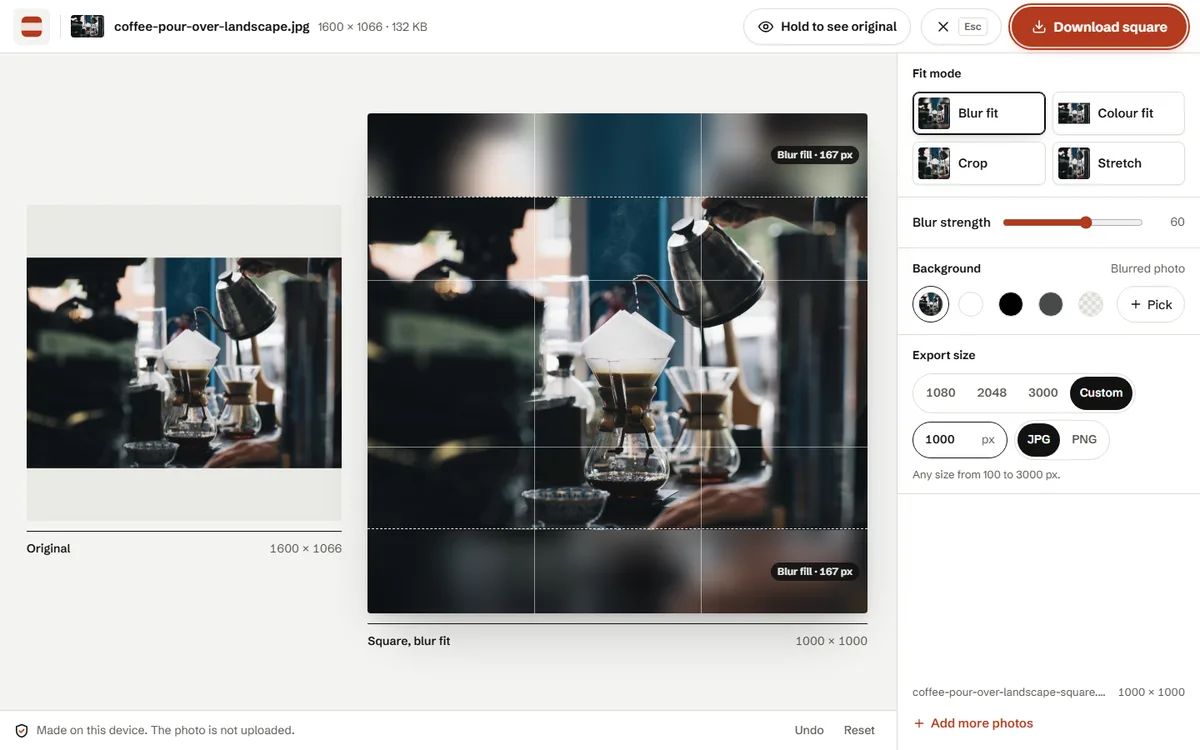
What are standard square image sizes in pixels?
Standard square sizes in pixels are 1080 × 1080 for posts, 320 to 400 for profile pictures, 1000 to 2000 for shop photos and 3000 × 3000 for covers.
Thumbnails sit between them, at 500 or 600 pixels. Each of these is a 1:1 square; only the number of pixels changes.
Is 1080x1080 a square?
Yes, 1080 × 1080 is a square, because the width and the height are both 1080 pixels. It holds 1,166,400 pixels, or about 1.17 megapixels.
Instagram's Help Center says photos 320 to 1080 pixels wide keep their resolution, so a 1080 square posts at its own size.
See how square posts look on Instagram.
You can make a 1080x1080 image from any photo.
What size is a square image for Facebook?
A square image for Facebook needs to be at least 600 pixels wide, the minimum in Meta's Ads Guide for feed images. 1080 × 1080 clears it easily.
Meta's guide names no square feed size; it recommends 4:5 at 1440 × 1800. For a Page profile picture, the Facebook Help Centre asks for 320 × 320.
Start here: which square size do you need?
Start with 1080 × 1080 if you post to social media. Five pages go deeper: posts, covers, profile pictures, shop photos and the 1:1 ratio.
 Start here1080 × 1080 imageThe square size Instagram keeps as it is, a tool locked to 1080 before you open a photo, and what a bigger file costs.Make a 1080x1080 image
- 023000 × 3000 imageThe size Apple Podcasts asks for, and the largest square this tool saves, with a warning when your photo is enlarged.

- 03Square profile pictureCrop a square with a circle guide and see it at avatar sizes before you save, with sizes for 8 platforms.

- 04Product photo sizeEtsy, eBay, Shopify and Amazon photo rules side by side, each quoted from the shop's own help page.
- 051:1 aspect ratioWhat 1:1 means, and how much of a 4:3, 3:2 or 16:9 photo a square crop keeps.
What size should a square image be?
A square image should be the size its platform asks for: 1080 × 1080 for an Instagram post, 320 for a Facebook profile picture, 2000 for Etsy.
To get there, read how to make a picture square.
When a page names no size, pick about twice the width the image is shown at, so it stays sharp on high-density screens.
How do I resize an image to 1080x1080 without cropping?
To resize an image to 1080 × 1080 without cropping, fit the whole photo inside the square and fill the empty sides with a blurred copy or a plain colour.
Pick 1080 in the size picker at the top of this page, then choose a photo. You can also fit any photo into a square from the homepage.
How do I resize an image into a square?
To resize an image into a square, choose one of 3 ways: fit it whole on a blur border or a white border, or crop it to a square.
Fitting keeps every pixel of the photo, while cropping cuts the long sides off. Stretching also fills the square, but it distorts faces and round objects.
File size of the same photo at 500, 1080, 2048 and 3000 px
A 3000 px square holds 36 times the pixels of a 500 px one, but in our test its JPG was only 16.1 times the file size.
PNG was 8 to 10 times bigger than JPG at every size.
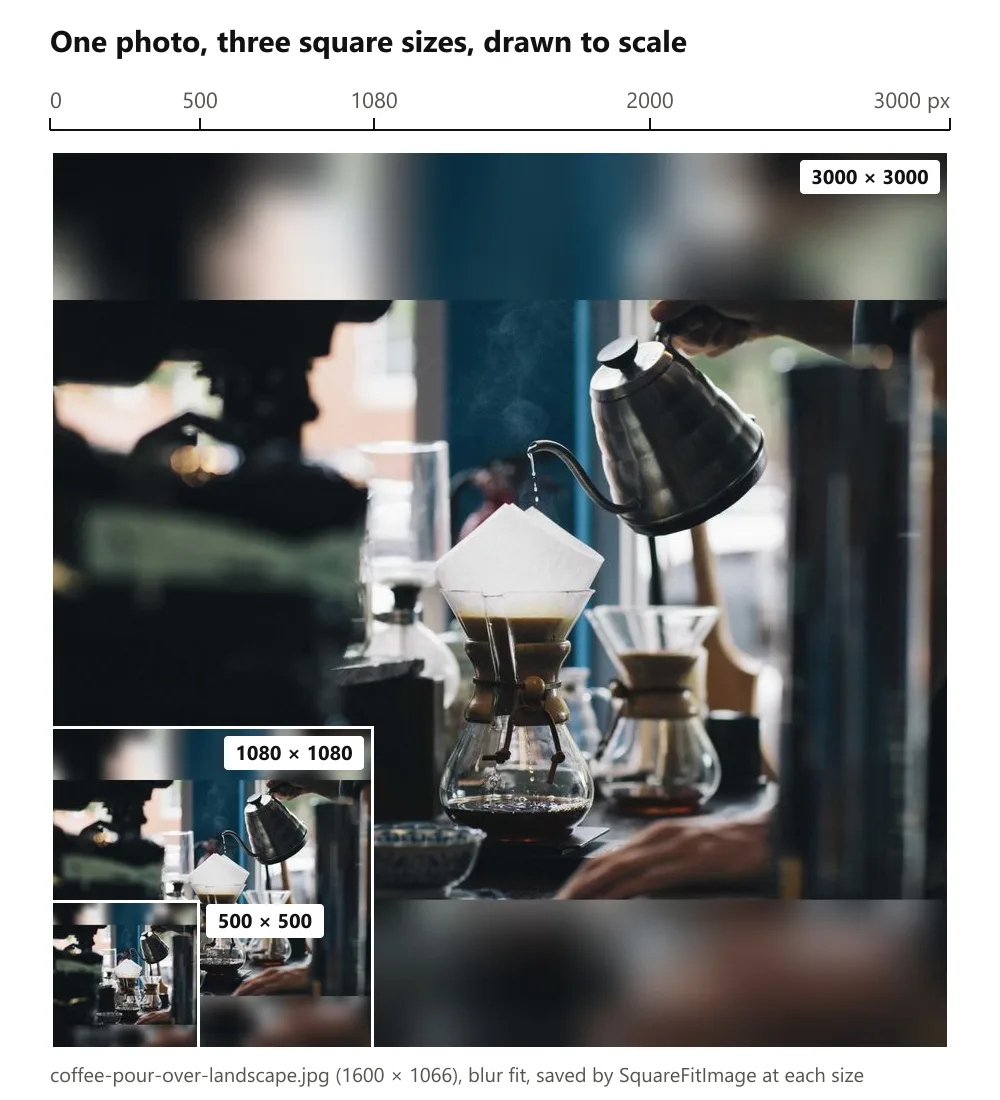
1080 is enough for a phone feed. Instagram sizes any wider photo down to 1080 pixels, so a bigger post only uploads more bytes.
3000 is for zoom and covers. Apple Podcasts asks for 3000 × 3000, and Amazon turns on zoom from 1,000 pixels on the longest side.
Enlarging adds no detail. Our 1600 px photo saved at 3000 px meets a size rule, but it is no sharper than the original.
| Square | Megapixels | Coffee, blur, JPG | Coffee, blur, PNG | Coffee, white, JPG | Mug, white, JPG |
|---|---|---|---|---|---|
| 500 × 500 | 0.25 MP | 45 KB | 378 KB | 40 KB | 45 KB |
| 600 × 600 | 0.36 MP | 60 KB | 520 KB | 54 KB | 60 KB |
| 1000 × 1000 | 1 MP | 141 KB | 1.23 MB | 129 KB | 134 KB |
| 1080 × 1080 | 1.17 MP | 160 KB | 1.39 MB | 145 KB | 147 KB |
| 2000 × 2000 | 4 MP | 408 KB | 3.76 MB | 372 KB | 346 KB |
| 2048 × 2048 | 4.19 MP | 423 KB | 3.89 MB | 386 KB | 362 KB |
| 3000 × 3000 | 9 MP | 723 KB | 6.94 MB | 658 KB | 624 KB |
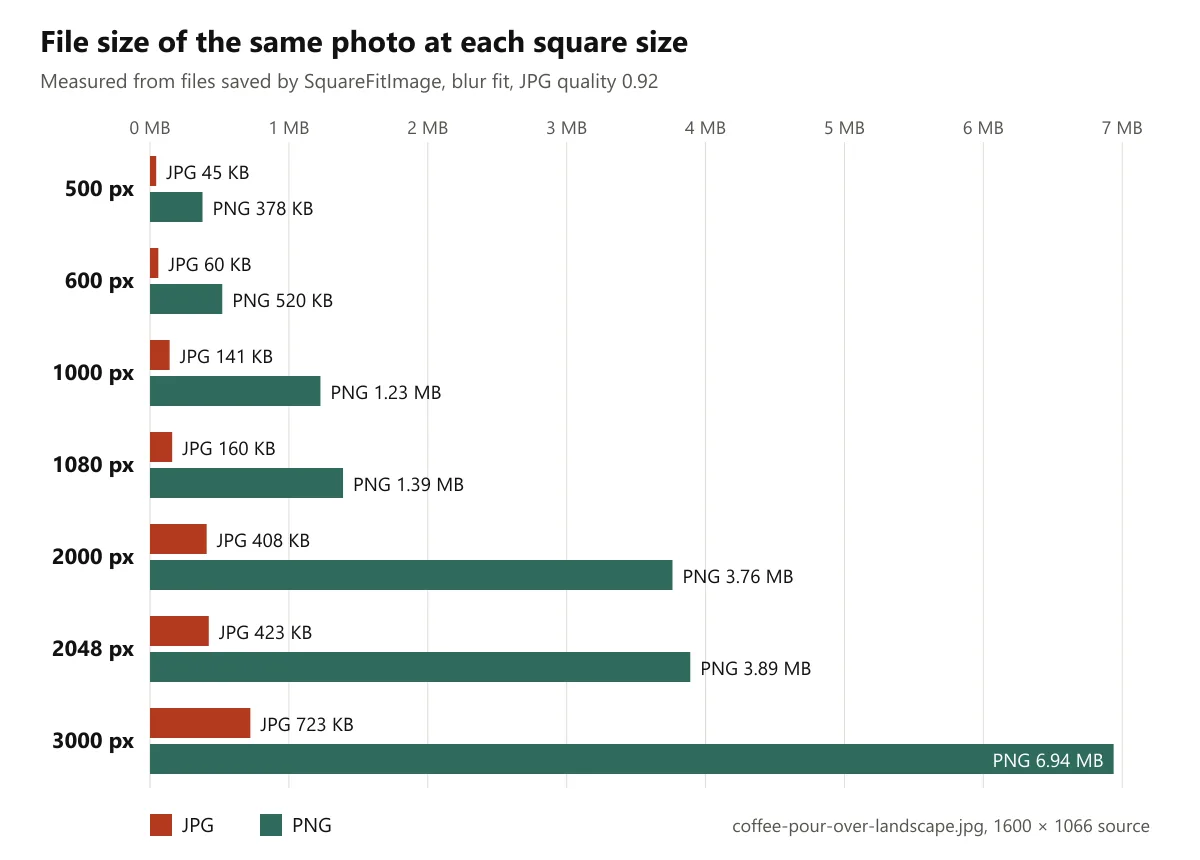
SquareFitImage saves only two formats: JPEG, shortened to JPG, and PNG. Use JPG for photos and PNG when the square needs a transparent background, which JPG cannot store.
The method: we opened each size with a "Make" link, chose the photo, set the fill and format, saved the file and recorded its bytes.
That made 56 files in all: 2 photos, 7 sizes, 2 fills and 2 formats, each one checked to be the exact square size asked for.
Why profile picture sizes are smaller
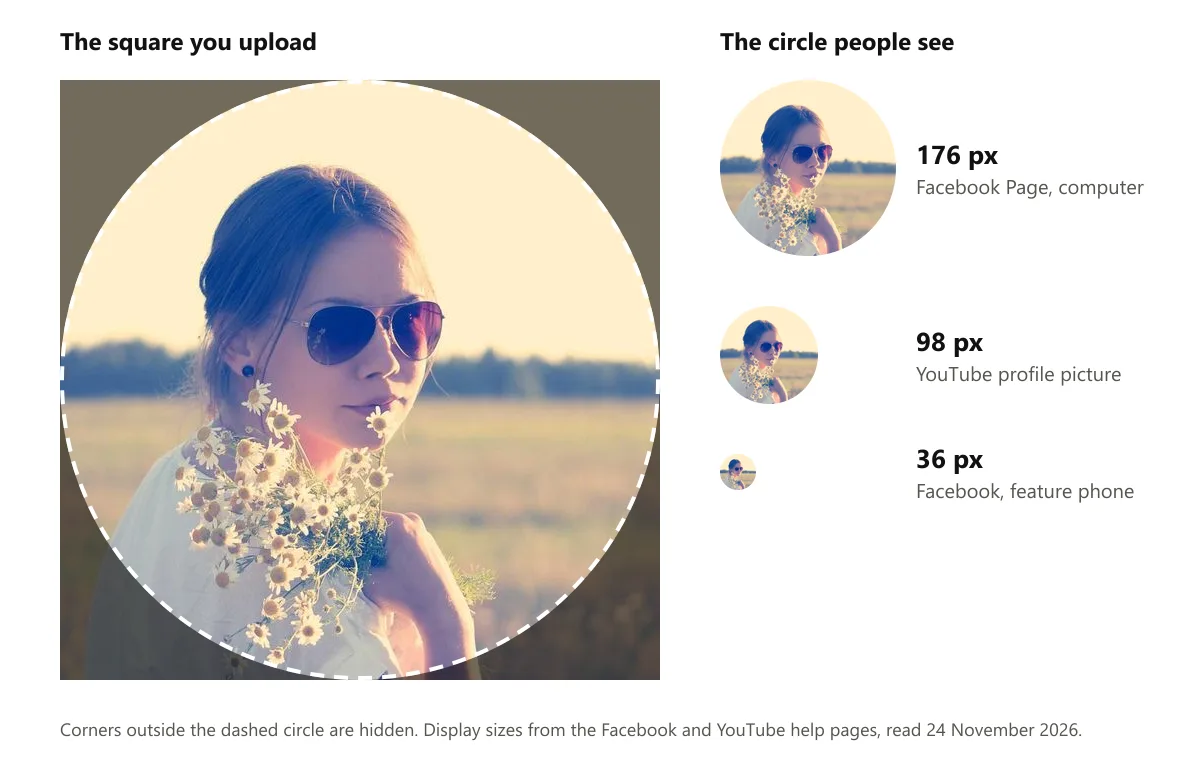
Profile picture sizes are smaller because a profile picture (avatar) is shown tiny and cut to a circle. A few hundred pixels already cover the largest place it appears.
The Facebook Help Centre says a Page profile picture should be 320 × 320, is cropped to a circle and displays at 176 × 176 pixels on computers.
What size should profile pictures be?
Profile pictures should be 320 to 400 pixels square: 320 × 320 on Facebook and 400 × 400 for an Etsy profile photo. YouTube states no upload size.
Keep the face in the middle, because the corners fall outside the circle. Our page on square profile picture sizes covers 8 platforms with a circle guide.
Square sizes in inches and centimeters for print
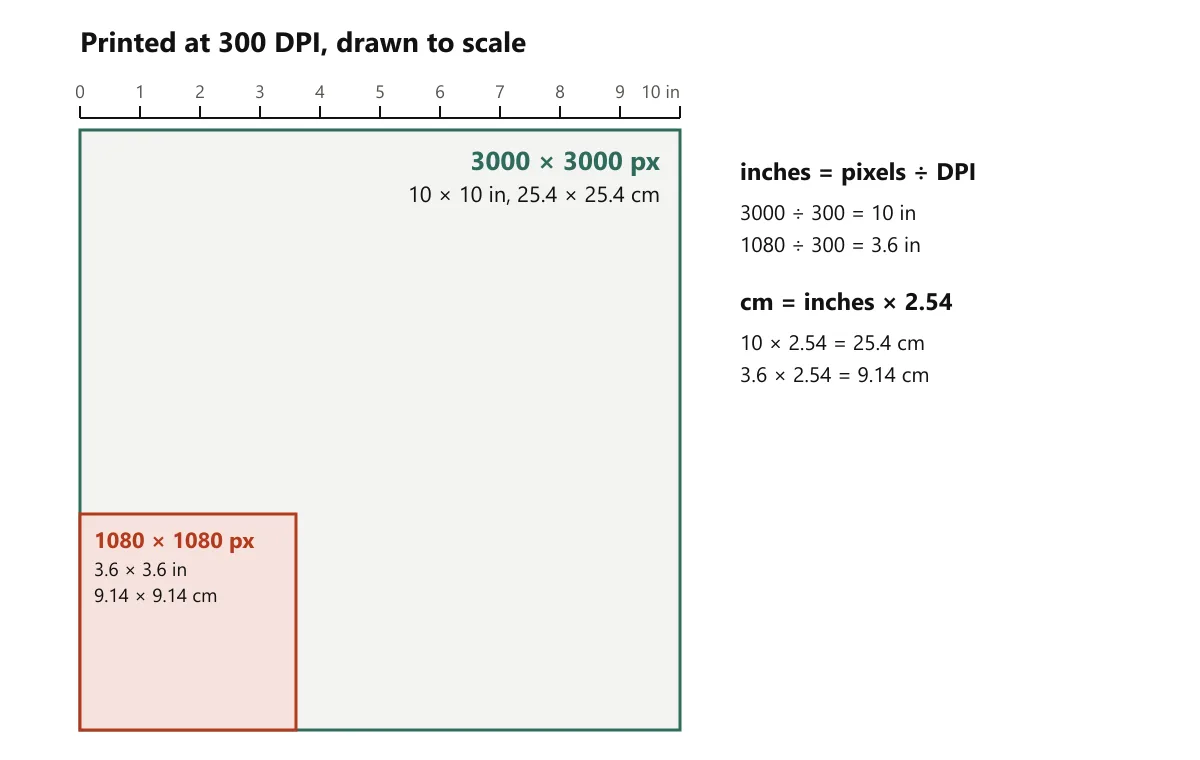
To find a square's print size in inches, divide its pixels by the print resolution in dots per inch (DPI). For centimeters, multiply the inches by 2.54.
A 3000 px square printed at 300 DPI is 10 inches (25.4 cm) wide. A 1080 px square at 300 DPI is 3.6 inches (9.14 cm) wide.
DPI is a print setting only. A screen shows pixels, so the dots per inch number in a file changes nothing online.
What is the square photo size in cm?
The square photo size in cm depends on its pixels and the print DPI. At 300 DPI, 1080 pixels is 9.14 cm and 3000 pixels is 25.4 cm.
For a print 10 inches wide at 300 DPI you need 3000 pixels, so make a 3000x3000 image before ordering it.
| Square | Inches | Centimeters |
|---|---|---|
| 500 × 500 px | 1.67 in | 4.23 cm |
| 1080 × 1080 px | 3.6 in | 9.14 cm |
| 2000 × 2000 px | 6.67 in | 16.93 cm |
| 3000 × 3000 px | 10 in | 25.4 cm |
Any size works if width equals height (1:1)
A square image has a 1:1 aspect ratio, which means equal width and height in pixels. Any square size, from 100 to 3000 px in this tool, is 1:1.
Is a square photo a 1:1 ratio?
Yes, a square photo is a 1:1 ratio, because its width and height are equal. A 600 × 600 photo and a 2048 × 2048 photo are both 1:1.
What does 1:1 image size mean?
A 1:1 image size means one unit of width for every unit of height. It names a shape, not a size, so it gives no pixel count.
Is 4:3 aspect ratio a square?
No, 4:3 is not a square. A 4:3 photo is a third wider than it is tall, and a 1:1 crop of it keeps 75% of the picture.
See what the 1:1 ratio means for 3:2 and 16:9 photos, or the aspect ratio changer for 4:5 and other shapes.
How do I keep the aspect ratio when resizing an image to a square?
To keep the aspect ratio when resizing to a square, shrink the photo until its long side fits, then fill the gap with blur or colour instead of stretching it.
That is what Blur fit and Colour fit do. For an Instagram feed post, you can also post the whole photo without cropping at 4:5.
Questions about square sizes
A square picture has equal pixels across and down, so any size works. The most used square size is 1080 × 1080 pixels, which Instagram keeps unchanged.
Profile pictures run smaller, from 320 to 400 pixels, and covers and shop photos larger, up to 3000 × 3000.
A square image ratio is 1:1, which means the width and the height are equal. 500 × 500, 1080 × 1080 and 3000 × 3000 are all 1:1.
A square thumbnail is usually 500 × 500 or 600 × 600 pixels. Make it twice the width it is shown at, so it stays sharp on high-density screens.
eBay's help page says search results show a listing picture at 96 pixels, and up to 400 × 400 when you hover over it.
No, a bigger square is not always better. Our 3000 px JPG was 4.5 times the file size of the 1080 px one (723 KB against 160 KB).
Instagram sizes any wider photo down to 1080 pixels, so the extra pixels only slow the upload there.
Yes, you can make a 2000 × 2000 image from a smaller photo. The file meets the size rule, but enlarging adds no new detail, so zoom shows softness.
SquareFitImage saves any square from 100 to 3000 px and warns you when the export is larger than your photo.