Make a 3000 × 3000 image
A 3000 × 3000 image is the square album covers and big shop photos need. Drop a photo and save it whole or cropped.
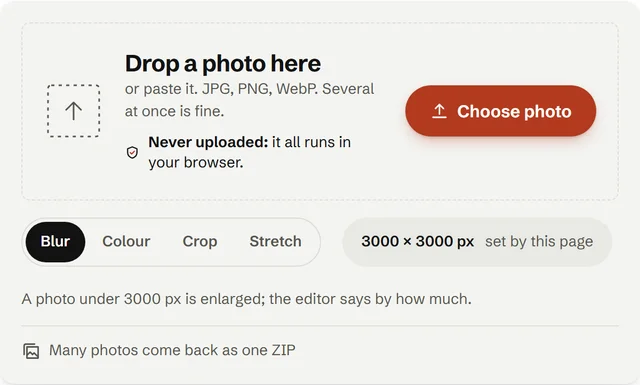
Drop a photo here
or paste it. JPG, PNG, WebP. Several at once is fine.
Never uploaded: it all runs in your browser.
3000 × 3000 pxset by this page
A photo under 3000 px is enlarged; the editor says by how much.
Freeno account, no watermark
Privatefiles stay on your device
3000 pxlargest preset export
Batchmany photos, one ZIP
How to make a 3000 x 3000 image
To make a 3000 x 3000 image, drop the photo in, pick Blur fit, Colour fit or Crop, choose JPG or PNG and download. The size is already set.
The result is a 1:1 square of 9 megapixels, made on your device. Need a smaller square? See all square image sizes.
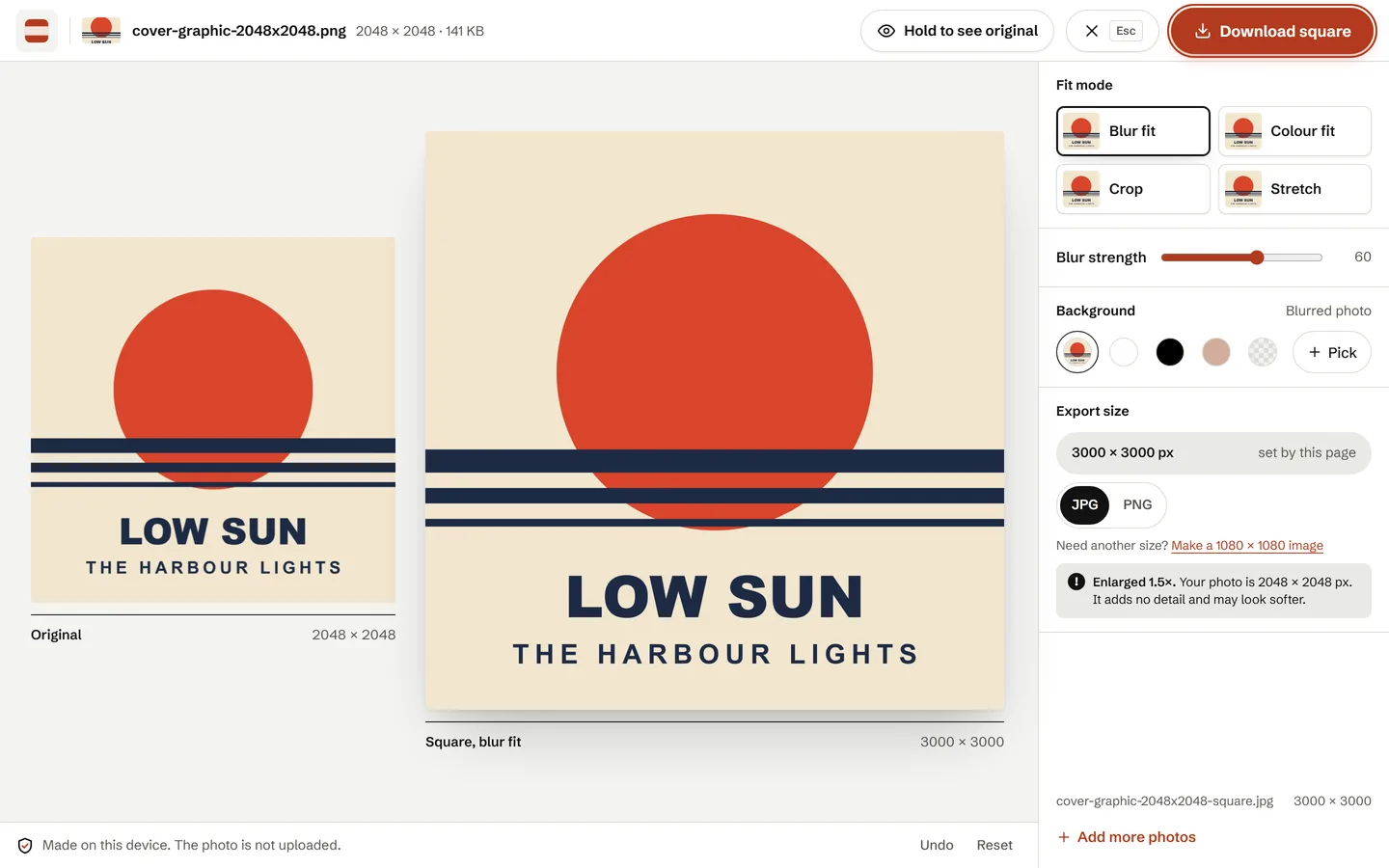
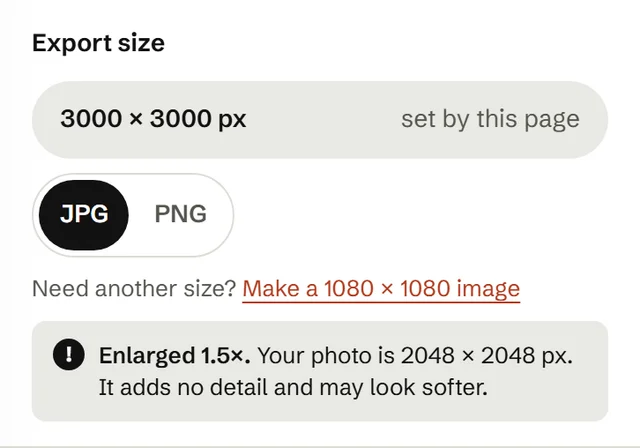
Real screenshot, 24 November 2026A 2048 px cover in the editor. The export panel says 3000 × 3000 px, set by this page, and Enlarged 1.5×.
Drop the photo or artwork
Drop it on the box, paste it, or press Choose photo. The editor opens over the page with the size already set to 3000 × 3000 px.
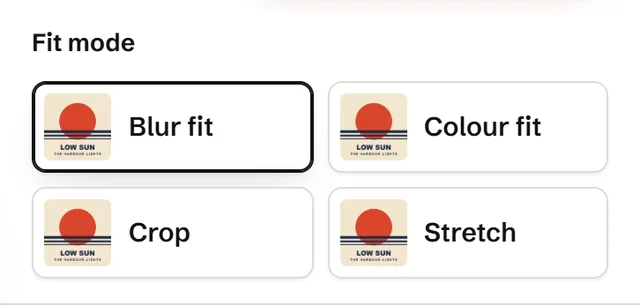
Pick Blur fit, Colour fit or Crop
Blur fit and Colour fit keep the whole picture and fill the empty bands. Crop fills the square and trims the long side.
Choose JPG or PNG and save
JPG makes the smaller file for photos. Press Download square and the file is saved with -square added to its name.
Album cover size: why 3000 x 3000 px
3000 x 3000 px is the album cover size DistroKid names as ideal, and the largest size CD Baby accepts. Both state it on their own help pages.
An album cover is the front artwork of a release. Streaming services show it as a square, so every cover has the same aspect ratio (1:1): width equals height.
A pixel is the smallest dot of colour in a digital image. A 3000 x 3000 cover holds 9,000,000 of them, one 9 megapixel (9 MP) square.
DistroKid's help page says the minimum is 1,000 × 1,000 pixels and that art should ideally be 3,000 × 3,000. It asks for JPG files in RGB colour.
CD Baby asks for 1,400 × 1,400 at least and 3,000 × 3,000 at most, as PNG, GIF or JPG, under 25 MB.
Spotify for Artists' Cover art requirements page accepts 640 to 10,000 px a side in TIFF, PNG or JPG. It also says: "Don't upscale images."
The Apple Music Style Guide (version 2.5, section 7) gives no pixel size. It rejects low quality or pixelated art, and art with web addresses, logos or QR codes.
Is 2000x2000 good for an album cover?
Yes, a 2000 x 2000 album cover passes the minimums of DistroKid, CD Baby and Spotify. It is below the 3,000 × 3,000 DistroKid calls ideal.
Don't enlarge a 2000 px cover to 3000 px to reach the ideal. Spotify asks you not to, and enlarging adds no detail.
| Service | Minimum, px | Maximum, px | Formats | File size limit | Colour |
|---|---|---|---|---|---|
| DistroKid | 1,000 × 1,000 | Not stated | JPG | Not stated | RGB |
| CD Baby | 1,400 × 1,400 | 3,000 × 3,000 | PNG, GIF, JPG | Less than 25 MB | RGB |
| Spotify for Artists | 640 × 640 | 10,000 × 10,000 | TIFF, PNG, JPG | Not stated | sRGB |
| Apple Music | Not stated | Not stated | Not stated | Not stated | Not stated |
What can I use a 3000 x 3000 image for?
You can use a 3000 x 3000 image for album covers, large product photos that shoppers zoom into, and square prints of 10 inches at 300 pixels per inch.
Keep the text on a cover to the artist and title. CD Baby says any text on the art must match the release details exactly.
DistroKid lists URLs, prices and social media logos among the things streaming services reject on cover art.
Turn a wide band photo into a square cover
To turn a wide band photo into a square cover, use Crop when the faces sit in the middle and Blur fit when the whole frame matters.
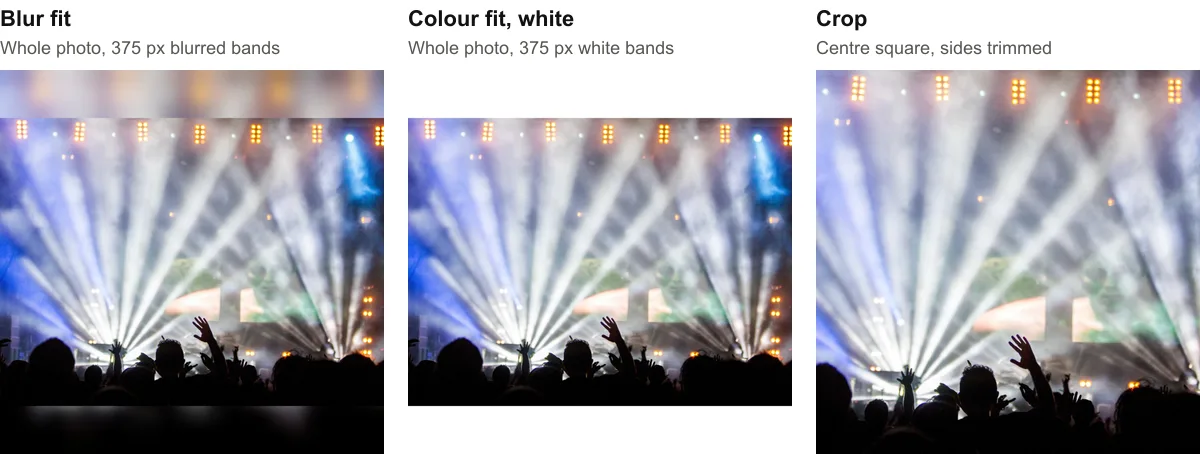
We made one 4032 × 3024 concert photo square three ways. Blur fit and Colour fit add a 375 px band above and below the 4:3 photo.
Blur fit fills those bands with a blurred background fill (Gaussian blur) look taken from the same photo. The tool shrinks a copy and stretches it back.
Crop keeps the middle 3024 × 3024 pixels and drops the outer edges. Nothing is added, so the cover is all photo.
To keep the whole frame, fill the edges with blur. To lose the edges instead, crop the artwork to square and move the square onto the band.
| Mode | File size | Verdict |
|---|---|---|
| Blur fit | 1.5 MB | Keeps the whole stage. The blurred bands carry the stage lights on, so the square reads as one picture. |
| Colour fit, white | 1.5 MB | Keeps the whole stage, but two white strips frame a dark photo. Better for a product than a cover. |
| Crop | 1.4 MB | Fills the square with no bands. It trims the outer lights, and the raised hands in the middle stay. |
Will a smaller photo look sharp at 3000 px?
No, a photo smaller than 3000 px won't gain sharpness at 3000 px. The tool enlarges it to fill the square, and the editor says by how much.
Will my image lose quality after resizing to 3000 px?
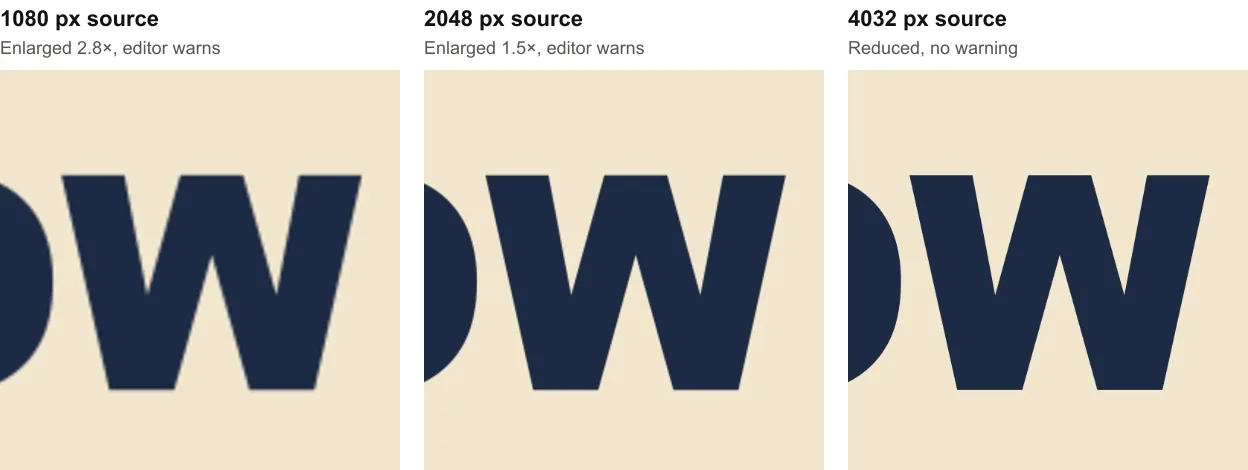
Your image keeps its detail when the side that fills the square is 3000 px or more: the long side in the fit modes, the short side in Crop.
A smaller original is enlarged to fill the square, and its edges turn soft.
Enlarging is image scaling (upscaling): the browser invents the new pixels by blending the ones around them. It can't add detail the camera never caught.
In our test, letter edges from the 1080 px cover kept 41% of the crispness of the 4032 px cover. The 2048 px cover kept 66%.
When does the editor warn about enlarging?
The editor warns when it enlarges the photo by 1.05× or more, shown rounded as 1.1×. For a square original, that means 2857 px or smaller.
A 2858 px square is enlarged too little to show a warning.
The warning reads like this for a 1080 px square: "Enlarged 2.8×. Your photo is 1080 × 1080 px. It adds no detail and may look softer."
| Original cover | Editor says | JPG file | Edge sharpness | Against the 4032 px cover |
|---|---|---|---|---|
| 1080 × 1080 px | Enlarged 2.8× | 177 KB | 0.75 | 41% |
| 2048 × 2048 px | Enlarged 1.5× | 181 KB | 1.22 | 66% |
| 4032 × 4032 px | No warning, reduced | 189 KB | 1.84 | 100% |
JPG or PNG at 3000 x 3000: the file sizes we measured
Save photos at 3000 x 3000 as JPG: the PNG was 5.5 to 8.7 times larger for every photo we tried.
JPG (JPEG) is a lossy format: it throws away detail the eye barely sees to make files small. This tool saves JPG at quality 92.
PNG is lossless: every pixel is stored exactly, so photos with noise and gradients become big files. Flat colour and sharp type compress well in PNG.
Our flat graphic cover was 188 KB as JPG and 284 KB as PNG. Choose PNG for a graphic cover when you want type with no JPG blur around it.
Every file was under CD Baby's 25 MB limit; the largest PNG was 10.9 MB. DistroKid takes JPG only, so save a DistroKid cover as JPG.
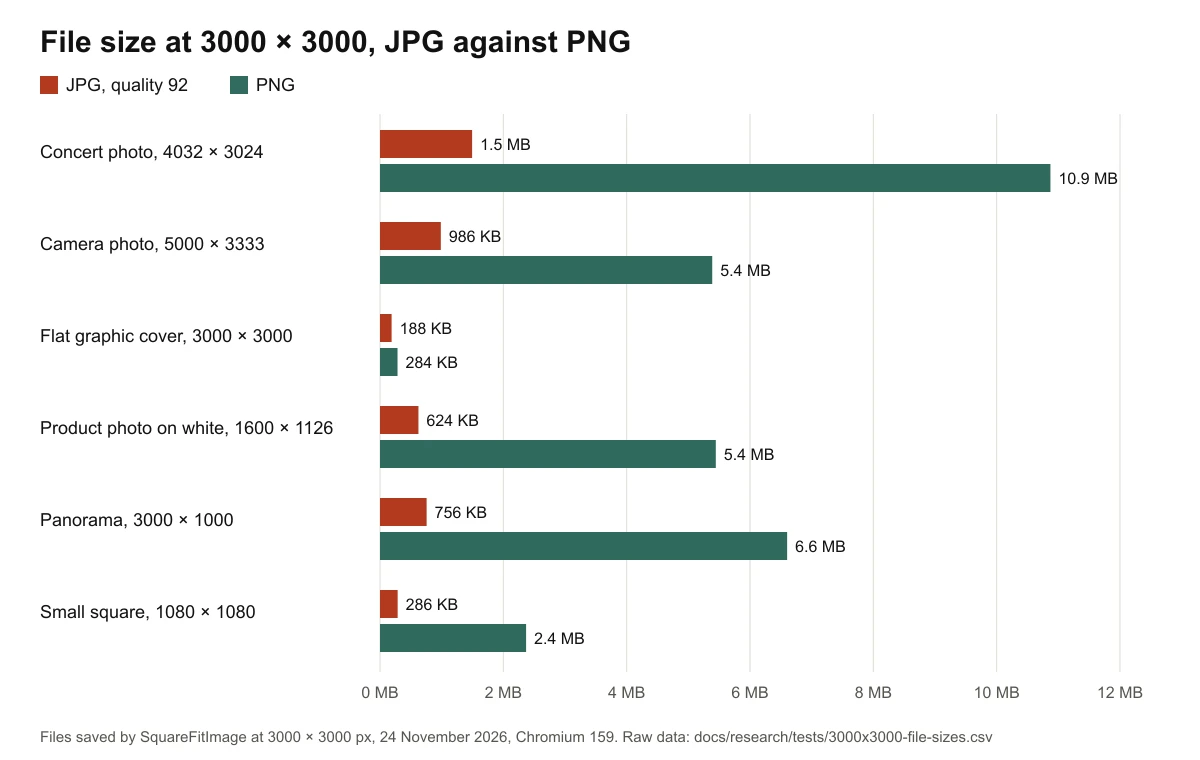
| Image | Original, px | Mode | JPG | PNG | PNG ÷ JPG | Editor warning |
|---|---|---|---|---|---|---|
| Concert photo, phone-size file | 4032 × 3024 | Blur fit | 1.5 MB | 10.9 MB | 7.3× | None |
| Camera photo of mountains | 5000 × 3333 | Blur fit | 986 KB | 5.4 MB | 5.5× | None |
| Flat graphic cover with large type | 3000 × 3000 | Colour fit, white | 188 KB | 284 KB | 1.5× | None |
| Product photo on white | 1600 × 1126 | Colour fit, white | 624 KB | 5.4 MB | 8.7× | Enlarged 1.9× |
| City panorama | 3000 × 1000 | Blur fit | 756 KB | 6.6 MB | 8.7× | None |
| Small square photo | 1080 × 1080 | Blur fit | 286 KB | 2.4 MB | 8.3× | Enlarged 2.8× |
How big a 3000 x 3000 image prints
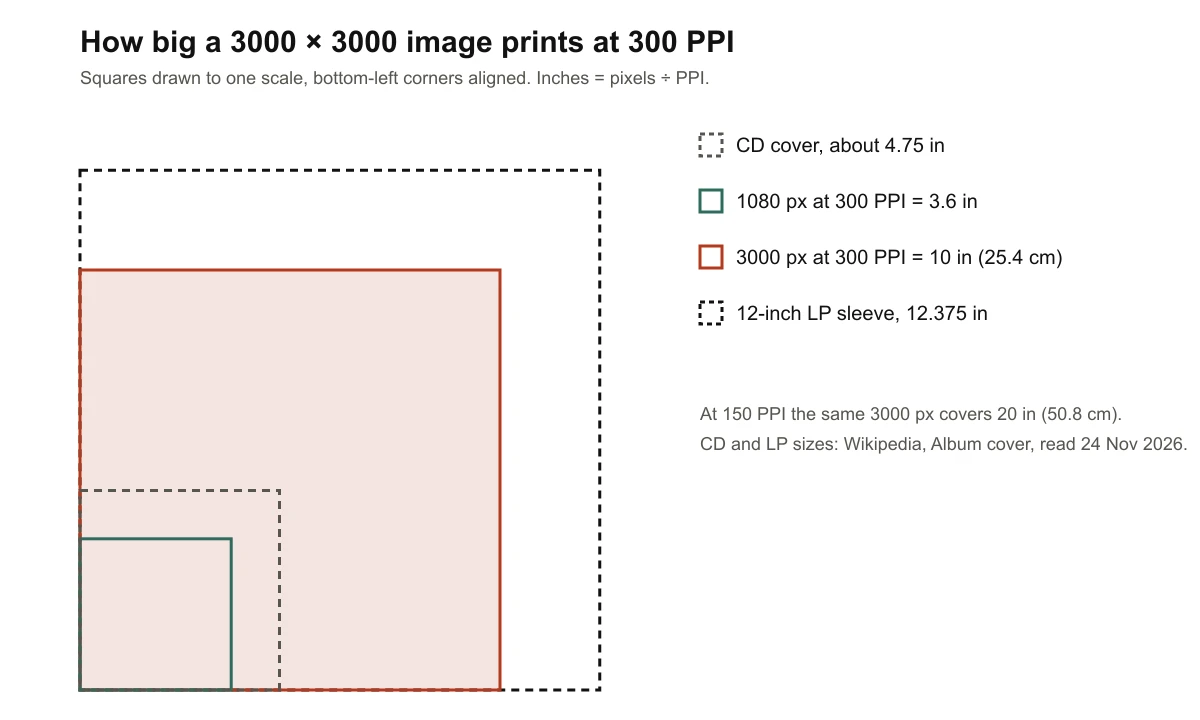
A 3000 x 3000 image prints 10 x 10 inches (25.4 x 25.4 cm) at 300 pixels per inch, the resolution CD Baby calls best for cover art.
Pixels per inch (PPI) is how many pixels of the image fill one inch of paper. More PPI gives a smaller, sharper print from the same file.
Inches = pixels ÷ PPI, and centimetres = inches × 2.54
Worked example: 3000 ÷ 300 = 10 inches a side, and 10 × 2.54 = 25.4 cm. At 150 PPI the same file covers 20 inches.
How big is a 12-inch record cover?
A 12-inch record cover is 12.375 inches (31.43 cm) square, according to Wikipedia's Album cover article. At 300 PPI that takes 3713 px.
A 3000 px cover printed on that sleeve gives 242 PPI, a little under 300.
Are CD covers 5x5 inches?
No, CD covers aren't quite 5x5 inches. Wikipedia gives about 4.75 inches (12.1 cm) square, or 1425 px at 300 PPI. A 3000 px file is more than enough.
| Export, px | PPI | Print size, inches | Print size, cm |
|---|---|---|---|
| 1080 × 1080 | 300 | 3.6 × 3.6 | 9.1 × 9.1 |
| 1080 × 1080 | 150 | 7.2 × 7.2 | 18.3 × 18.3 |
| 2048 × 2048 | 300 | 6.8 × 6.8 | 17.3 × 17.3 |
| 2048 × 2048 | 150 | 13.7 × 13.7 | 34.7 × 34.7 |
| 3000 × 3000 | 300 | 10 × 10 | 25.4 × 25.4 |
| 3000 × 3000 | 150 | 20 × 20 | 50.8 × 50.8 |
Large square product photos at 3000 px
Export product photos at 3000 px when the shop lets buyers zoom in, so the zoomed view has real detail. Start from an original at least that large.
Use Colour fit with white for a product on a plain background. The whole item stays in frame, and white fills the sides.
Our 1600 × 1126 mug photo was enlarged 1.9× to reach 3000 px. Its JPG came to 624 KB, but it holds no more detail than the original.
Each marketplace sets its own minimum and maximum. Read the listing photo sizes by marketplace before you pick 3000 px for a shop.
For other shapes and sizes, the main editor can make any image square online at 1080, 2048 or 3000 px, or any size from 100 to 3000.
Make a 3000 x 3000 cover on your phone
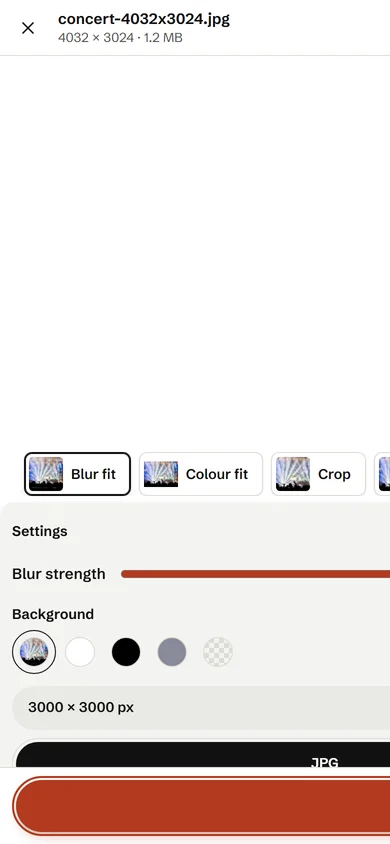
To make a 3000 x 3000 cover on your phone, open this page in the phone's browser, tap Choose photo and pick the picture. The editor fills the screen.
Can I use the 3000 x 3000 maker on my phone?
Yes, the 3000 x 3000 maker works on a phone screen. The square sits on top, the fit modes scroll sideways, and Download square stays at the bottom.
The tool uses in-browser processing (no upload): the photo is drawn and saved on the phone itself, so a cover can't leak before release day.
The editor opens photos up to 100 megapixels. We tested the phone layout at 390 px wide in Chromium, not yet on a real iPhone or Android phone.
SquareFitImage and other 3000 x 3000 resizers compared
We gave SquareFitImage, liite.co and ZeeConvert the same three photos on 24 November 2026 and saved each site's default 3000 x 3000 file.
| Feature | SquareFitImage | liite.co | ZeeConvert |
|---|---|---|---|
| Saved size | 3000 × 3000 | 3000 × 3000 | 3000 × 3000 |
| What it does by default | Blur fit: whole photo, blurred bands | Crops the photo to fill | Stretches the photo to fill |
| Other fit choices | Colour fit, Crop, Stretch | Contain, blur fill | Lock aspect ratio, a Crop tab |
| Save as | JPG, PNG | JPG, PNG, WebP | JPG, PNG, WebP |
| Photo sent to a server | No | No | No |
| Watermark | None | None | None |
| File size, 4032 × 3024 concert photo | 1.5 MB | 1.4 MB | 5.8 MB |
| File size, 1600 × 1126 mug photo | 666 KB | 685 KB | 3.1 MB |
| File size, 1080 × 1080 coffee photo | 286 KB | 297 KB | 1.4 MB |
Where they do better: liite.co and ZeeConvert also save WebP, and liite.co shows a JPG quality slider. liite.co's concert file was 70 KB smaller than ours.
Where they do worse: ZeeConvert stretched both wide photos out of shape, and its files were 3.9 to 4.7 times our size. liite.co crops by default.
3000 x 3000 image questions
Yes, you can resize any photo to 3000 x 3000 pixels if your browser can open it and it holds no more than 100 megapixels.
A photo smaller than 3000 px is enlarged to fit, and the editor shows the factor. A 1080 px square reads Enlarged 2.8×.
You can resize JPG, PNG and WebP files to 3000 x 3000 here, and save the square as JPG or PNG.
HEIC and AVIF files open only where your browser can decode them. If it can't, the editor asks you to save the photo as JPG or PNG first.
A 3000 x 3000 image is 9 megapixels: 9,000,000 pixels, all in one square.
That is about 8 times the pixels of a 1080 x 1080 square.
1080 x 1080 is enough when the square is only seen on a screen, never printed, zoomed or sent to a music distributor.
For a feed post or a thumbnail, export a 1080x1080 image instead. It holds 1.17 megapixels, so the file is much smaller.
Yes, you can make up to 30 squares at once, all at 3000 x 3000 px, and save them as one squares.zip file.
The fit mode and format apply to every photo in the batch. The button reads Download all (.zip) once every photo is ready.