Make a 1080 × 1080 image
A 1080 × 1080 image is a square 1080 pixels wide and 1080 high. Drop any photo to get exactly that size, whole or cropped.
Drop a photo here
or paste it. JPG, PNG, WebP. Several at once is fine.
Never uploaded: it all runs in your browser.
1080 × 1080 pxset by this page
Need it bigger? 3000 × 3000
Freeno account, no watermark
Privatefiles stay on your device
3000 pxlargest preset export
Batchmany photos, one ZIP
Your 1080 × 1080 square, before you save it
Once a photo is in, the editor shows the original beside the 1080 × 1080 result.
The size stays locked at 1080. The fit, blur, background and JPG or PNG are yours to choose.
Nothing is uploaded, and Download square saves the file at once. For other platforms, look up every common square image size.
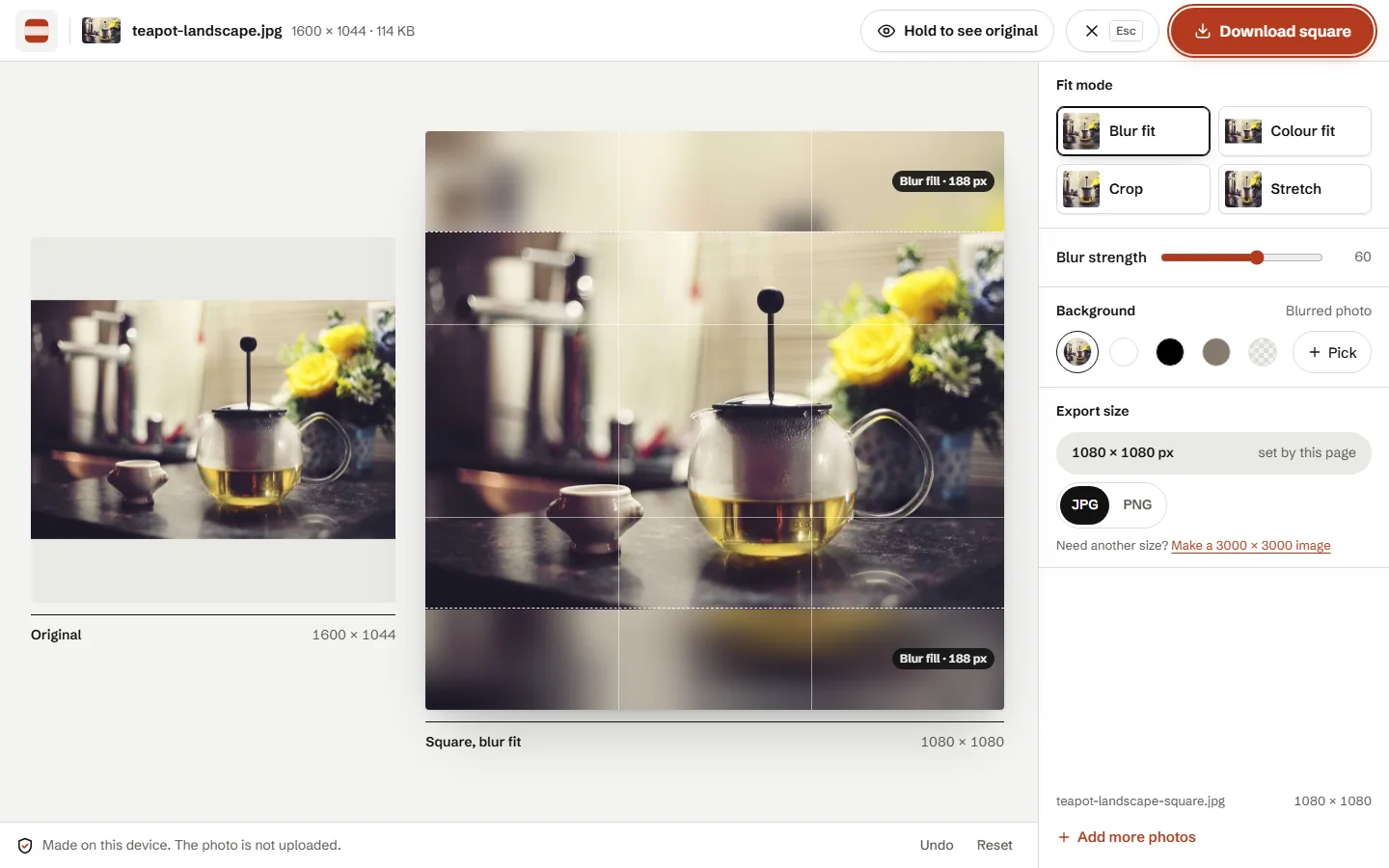
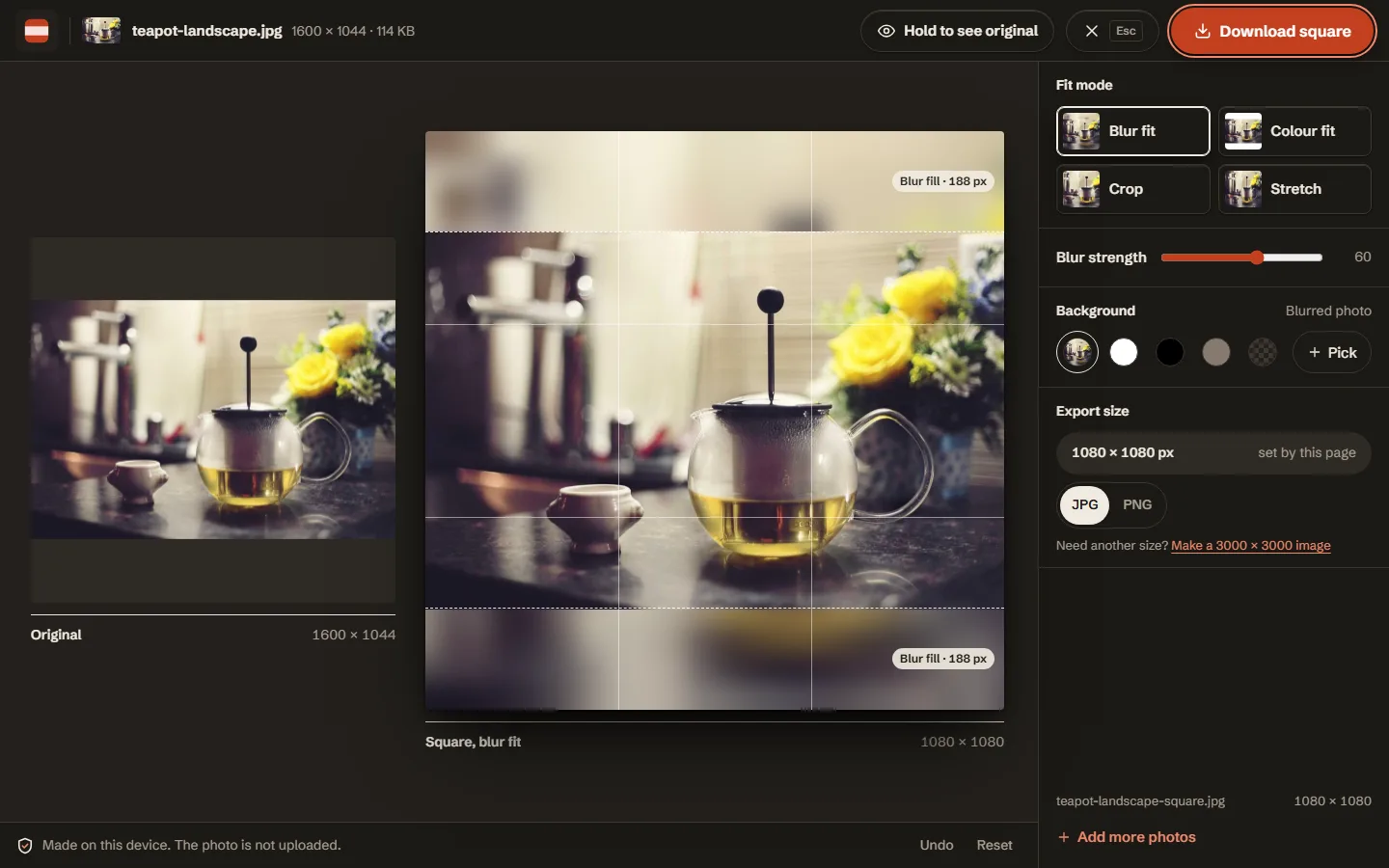
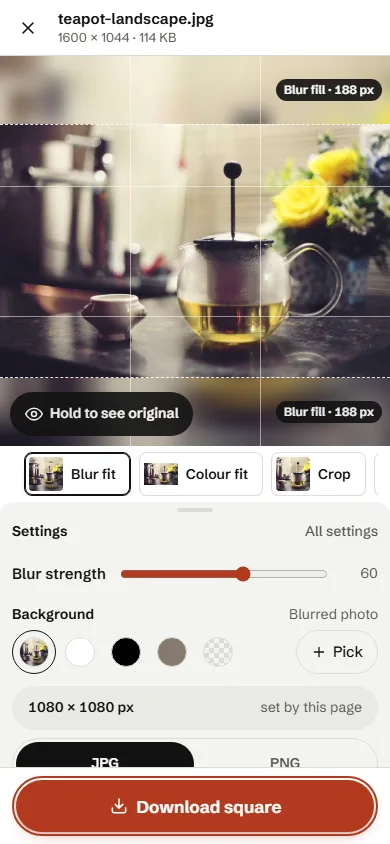
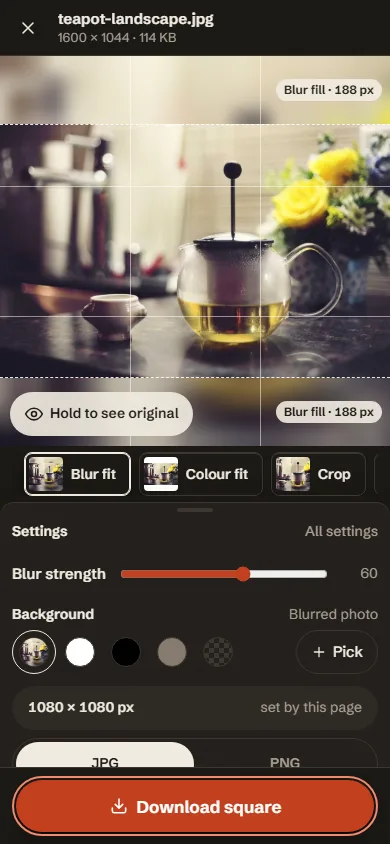
Real screenshotteapot-landscape.jpg, 1600 × 1044, Blur fit at 60. The blur bands are 188 px above and below the photo.
What the editor shows
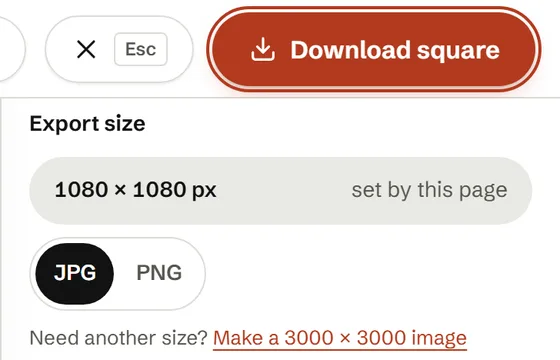
The Export size row reads 1080 × 1080 px, set by this page, so every file is that size. A link below opens the 3000 × 3000 maker.
Dashed lines mark where the photo ends and the fill begins. Each band carries its width in pixels, such as Blur fill · 188 px.
When the photo is too small
If the photo is smaller than 1080 px, a notice appears under the JPG and PNG choice. It names the enlargement and says the square may look softer.
The file still saves at 1080 × 1080. The notice is there so a soft result is never a surprise.
Make a 1080 × 1080 image in three steps
How do I resize an image to 1080x1080?
To resize an image to 1080x1080, drop it on this page, pick how it fills the square, and download it. Every file comes out at exactly 1080 × 1080 pixels.
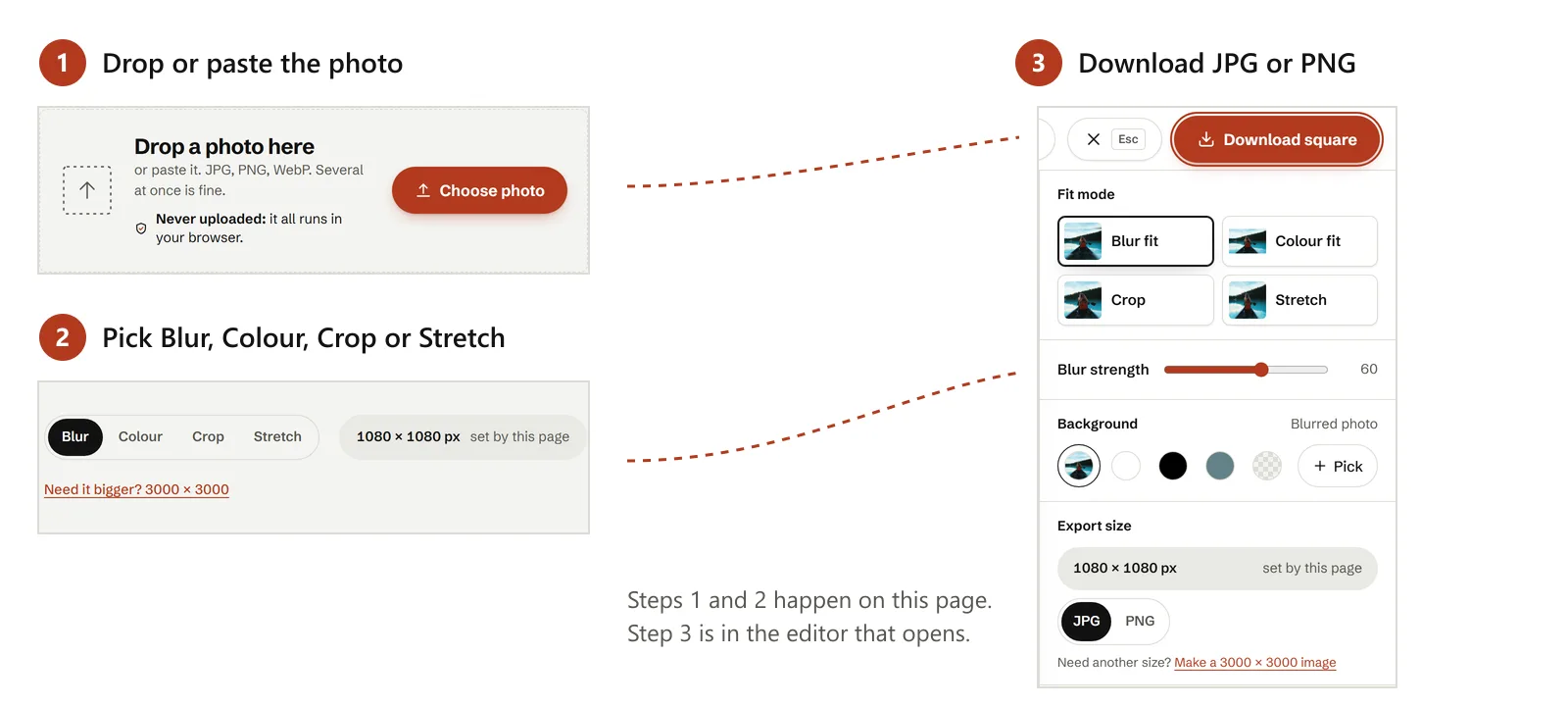
It is free, needs no account, and runs in your browser. Steps 1 and 2 happen on this page; step 3 is in the editor that opens.
- 1
Drop or paste the photo
Drop the photo on the box, paste it, or press Choose photo. Up to 30 photos can go in together, and each one becomes its own square.
- 2
Pick Blur, Colour, Crop or Stretch
Blur and Colour keep the whole photo and fill the empty bands. Crop fills the square and trims the long side. Stretch bends the photo to fit.
- 3
Download JPG or PNG
Choose JPG or PNG in the editor, then press Download square. The file is saved as the photo's name with -square added, at 1080 × 1080.
Is 1080x1080 a square, and is it the same as 1:1?
Yes, 1080x1080 is a square, because its width and height are both 1080 pixels. The 1:1 ratio describes that shape; 1080 × 1080 is one size with it.
So 1:1 and 1080 × 1080 are not the same thing. A 500 × 500 or a 3000 × 3000 image is also 1:1, with fewer or more pixels.
An aspect ratio is width divided by height, and for every square it is 1. Read what a 1:1 aspect ratio means in each unit.
What does px mean in picture size?
Px means pixels. A pixel is the smallest dot of colour in a digital image, so 1080 px wide means 1080 dots across.
A 1080 × 1080 image holds 1,166,400 pixels, about 1.17 megapixels. One megapixel is one million pixels.
Pixels have no fixed physical size. The print size depends on dots per inch (DPI): at 300 DPI, 1080 pixels print 3.6 inches, or 9.14 cm, wide.
How a photo becomes 1080 × 1080: fit or crop
A photo becomes 1080 × 1080 by scaling it with one number, then filling the gap (fit) or trimming the overflow (crop). Both keep the photo's shape.
Fit: scale = 1080 ÷ longest sideCrop: scale = 1080 ÷ shortest side
A worked example
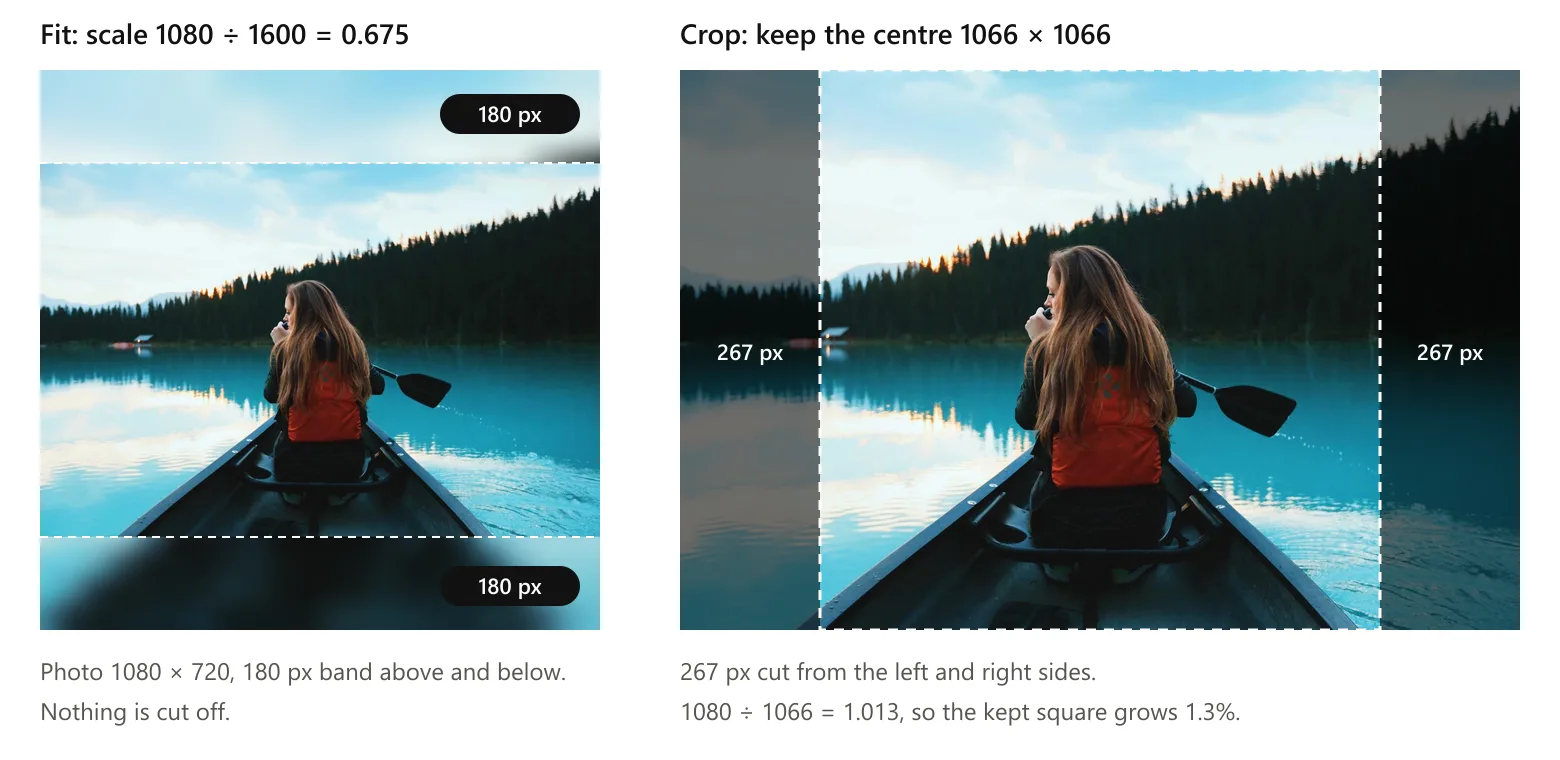
The canoe photo is 1600 × 1066. To fit, 1080 ÷ 1600 = 0.675, so it becomes 1080 × 720.
That leaves 360 px, split into two bands of 180 px, one above and one below the photo.
To crop, the tool keeps the centre 1066 × 1066 and cuts 267 px from each side. Then 1080 ÷ 1066 = 1.013, so it grows 1.3%.
How do I resize an image to 1080x1080 without cropping it?
To resize an image to 1080x1080 without cropping it, pick Blur or Colour. The whole photo is scaled to fit, and the two empty bands are filled.
This padding (letterbox and pillarbox bands) sits above and below a wide photo, or left and right of a tall one.
To fill the bands with blur, keep Blur, the default.
The result looks like a Gaussian blur fill, but the tool makes it another way.
It shrinks a copy of the photo to a 32 px long side at strength 60, then stretches it back over the square.
How do I keep a photo's aspect ratio when resizing it to 1080 × 1080?
To keep a photo's aspect ratio when resizing it to 1080 × 1080, scale both sides by the same number. Blur, Colour and Crop all do that.
Stretch is the one mode that breaks the ratio. The canoe photo stretched to 1080 × 1080 is squeezed 33% sideways, so faces and circles look wrong.
How do I add borders to an image so it fits a square?
To add borders so an image fits a square, choose Colour, then a background: white, black, a colour sampled from the photo, or any colour you pick.
Transparent is there too, and it saves as PNG only. For an even frame on all four sides instead, add an even white border.
Common photo sizes at 1080 × 1080
| Photo | Ratio | Fit: photo in the square | Fit: band per side | Crop: part kept | Crop: cut per side |
|---|---|---|---|---|---|
| 4032 × 302412 MP phone, landscape | 4:3 | 1080 × 810 | 135 px above and below | 3024 × 3024 | 504 px left and right |
| 3024 × 403212 MP phone, portrait | 3:4 | 810 × 1080 | 135 px left and right | 3024 × 3024 | 504 px top and bottom |
| 6000 × 400024 MP camera | 3:2 | 1080 × 720 | 180 px above and below | 4000 × 4000 | 1000 px left and right |
| 1920 × 1080Screenshot or video frame | 16:9 | 1080 × 608 | 236 px above and below | 1080 × 1080 | 420 px left and right |
| 1080 × 1350Instagram portrait post | 4:5 | 864 × 1080 | 108 px left and right | 1080 × 1080 | 135 px top and bottom |
| 1080 × 1920Story or reel frame | 9:16 | 608 × 1080 | 236 px left and right | 1080 × 1080 | 420 px top and bottom |
Every row is image scaling (upscaling and downscaling) by one factor. Each of these photos is downscaled, because each side is at least 1080 px; none needs enlarging.
Where 1080 × 1080 is used, and what each platform does to it
1080 × 1080 is the width Instagram keeps for a square feed post. Facebook, LinkedIn and X (Twitter) show square photos too, but their help pages name no square size.
“When you share a photo that has a width between 320 and 1080 pixels, we keep that photo at its original resolution …
… as long as the photo's aspect ratio is between 1.91:1 and 3:4.”
“If you share a photo at a higher resolution, we size it down to a width of 1080 pixels.”
A square is 1:1, inside Instagram's range, so Instagram keeps the whole of a 1080 × 1080 post at its own resolution.
A photo narrower than 320 pixels is enlarged to 320 pixels wide.
To fit a wide or tall photo into a post whole, post to Instagram without cropping with the 1:1 or 4:5 frame.
To check what size an Instagram square is, see that guide.
Profile photos are smaller and often shown round. They have their own page of square profile picture sizes by platform.
What the other help pages say
- Facebook: the Help Centre search for photo resolution listed 24 articles on 24 November 2026. None gave a pixel size for a feed photo.
- LinkedIn: the help page on Page images takes PNG or JPEG up to 3 MB. It names 1.91:1 (1200 × 627) only for posts with a link.
- X (Twitter): the help page on posting pictures answered our test browser with a bot check, so we could not read it.
We have not yet posted a 1080 × 1080 file to each feed to measure what comes back. Until we do, this page claims nothing beyond these help pages.
Enlarging a small photo to 1080 × 1080: what it costs
Enlarging a small photo to 1080 × 1080 costs sharpness, because image scaling (upscaling and downscaling) can only spread the pixels a photo already has.
Upscaling invents in-between pixels by blending neighbours; downscaling throws pixels away. The tool does both with the canvas drawImage method.
Smoothing is set to imageSmoothingQuality high, which blends more carefully. It still cannot bring back leaves, grain or texture that were never in the file.
On the forest photo, a 320 px source scored 0.589 SSIM once enlarged. The close crop shows why: leaves become soft blobs.
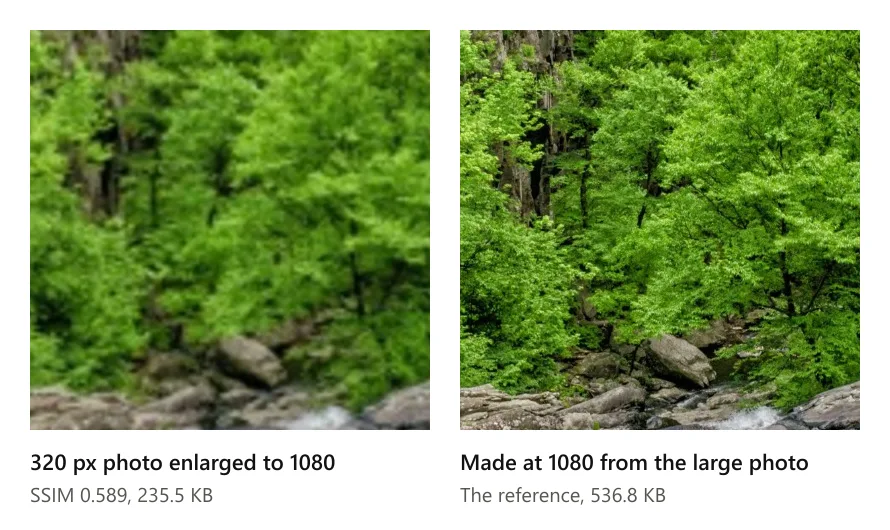
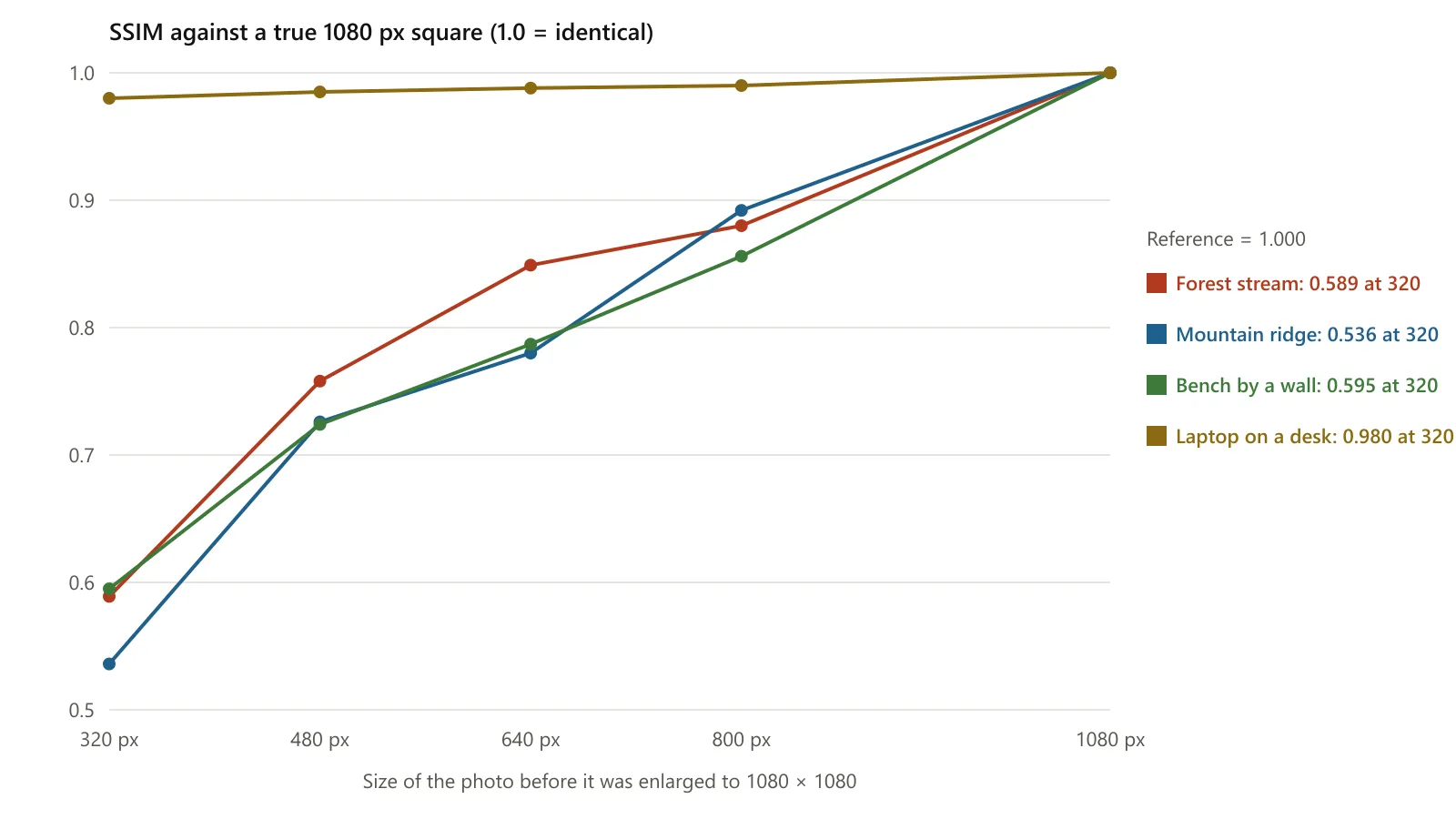
| Photo before enlarging | Editor says | Forest stream | Mountain ridge | Bench by a wall | Laptop on a desk |
|---|---|---|---|---|---|
| 320 × 320 px | Enlarged 3.4× | 0.58923.0 dB, 235.5 KB | 0.53620.1 dB, 198.6 KB | 0.59524.9 dB, 171.3 KB | 0.98039.7 dB, 76.0 KB |
| 480 × 480 px | Enlarged 2.3× | 0.75825.3 dB, 307.4 KB | 0.72622.4 dB, 287.1 KB | 0.72426.8 dB, 239.8 KB | 0.98542.1 dB, 83.4 KB |
| 640 × 640 px | Enlarged 1.7× | 0.84927.2 dB, 358.2 KB | 0.78023.4 dB, 314.1 KB | 0.78728.1 dB, 274.4 KB | 0.98843.8 dB, 91.9 KB |
| 800 × 800 px | Enlarged 1.4× | 0.88028.2 dB, 376.4 KB | 0.89226.2 dB, 398.6 KB | 0.85630.0 dB, 326.0 KB | 0.99044.6 dB, 96.5 KB |
| Reference, 1080 px | No notice | 1.000536.8 KB | 1.000513.6 KB | 1.000443.9 KB | 1.000110.5 KB |
How we measured it
We took four photos 4000 to 5000 px wide from Unsplash, through picsum.photos, and made each one square at 320, 480, 640, 800 and 1080 px with Crop.
Each small square was opened on this page and saved at 1080 as JPG. Every file was scored against the 1080 px square made straight from the large photo.
The structural similarity index (SSIM) compares local brightness, contrast and structure, and 1.0 means identical. Peak signal-to-noise ratio (PSNR) measures pixel error in decibels.
What we found
On the three detailed photos, a 320 px source scored 0.536 to 0.595. At 800 px it reached 0.856 to 0.892. Leaves, rock and rough plaster lost the most.
The laptop photo scored 0.98 even from 320 px. Its soft background and plain surfaces hold little fine detail, so there was little to lose.
For the 320 px squares, the editor showed: “Enlarged 3.4×. Your photo is 320 × 320 px. It adds no detail and may look softer.”
The notice appears once the enlargement rounds to 1.1× or more.
JPG or PNG at 1080 × 1080: what the file weighs
Save a 1080 × 1080 photo as JPG. In our test, the PNG of the same square was 7 to 9 times larger.
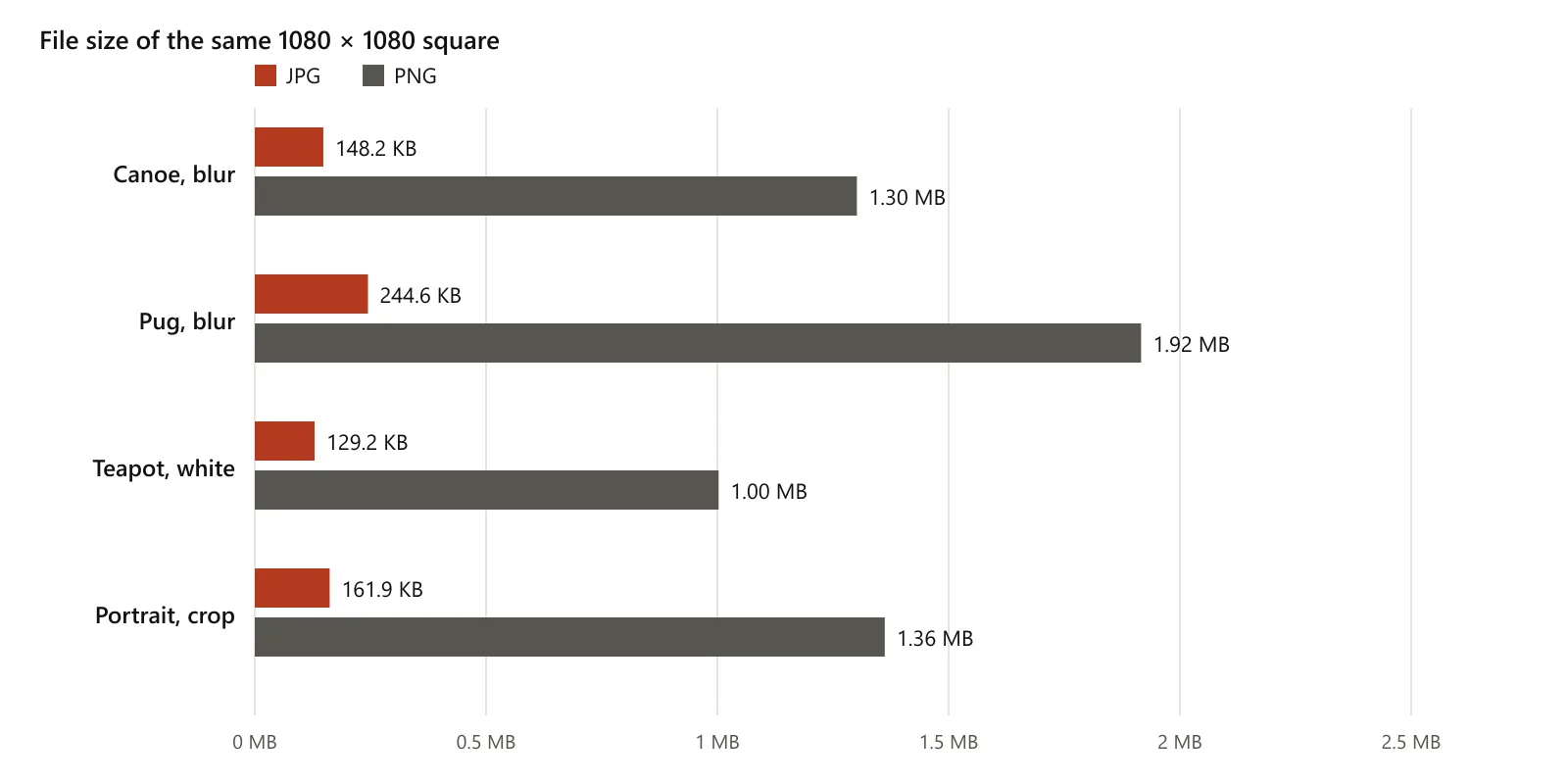
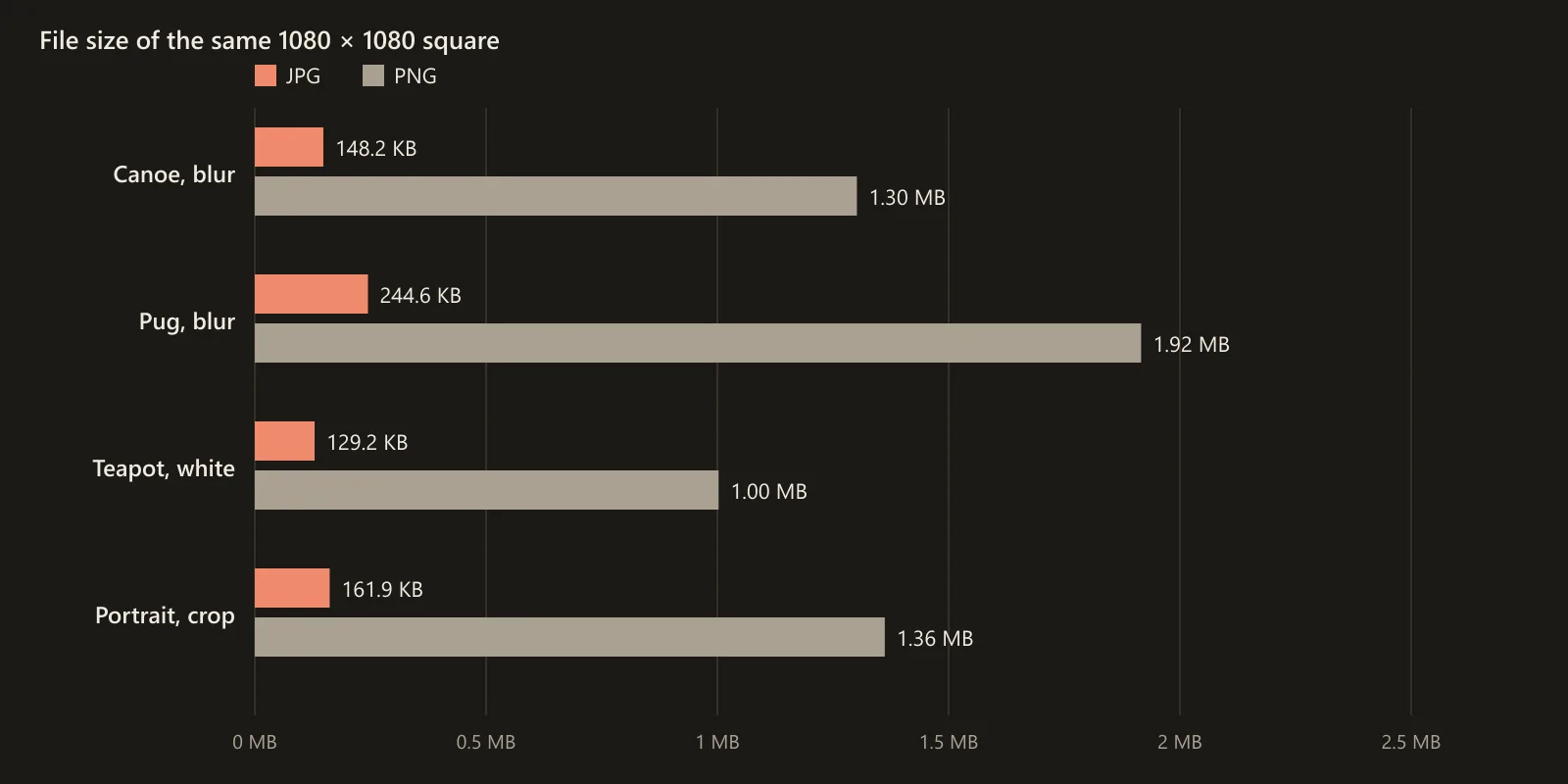
| Photo | Fit | JPG | PNG | PNG is larger by |
|---|---|---|---|---|
| Canoe on a lake | Blur | 148.2 KB | 1.30 MB | 8.8× |
| Canoe on a lake | Colour, white | 136.0 KB | 1.10 MB | 8.1× |
| Canoe on a lake | Crop | 162.7 KB | 1.42 MB | 8.7× |
| Pug in a blanket | Blur | 244.6 KB | 1.92 MB | 7.8× |
| Pug in a blanket | Colour, white | 232.9 KB | 1.68 MB | 7.2× |
| Pug in a blanket | Crop | 295.0 KB | 2.30 MB | 7.8× |
| Teapot on a table | Blur | 142.8 KB | 1.26 MB | 8.8× |
| Teapot on a table | Colour, white | 129.2 KB | 1.00 MB | 7.8× |
| Teapot on a table | Crop | 149.3 KB | 1.28 MB | 8.6× |
| Tall portrait | Blur | 136.1 KB | 1.20 MB | 8.8× |
| Tall portrait | Colour, white | 130.2 KB | 1.05 MB | 8.0× |
| Tall portrait | Crop | 161.9 KB | 1.36 MB | 8.4× |
JPEG is lossy: it drops fine detail to save space, and this tool saves it at quality 92.
PNG is lossless, so every pixel is kept and the file is far heavier.
Crop gave the heaviest JPG for every photo, because the whole square is photo detail. White bands gave the lightest, because flat colour compresses well.
How do I resize to 1080x1080 and compress the image?
To resize to 1080x1080 and compress the image, save it as JPG. Our four photos came out between 129.2 and 295.0 KB as JPG.
There is no quality slider here; quality 92 is fixed. Shrinking a 12 megapixel phone photo to 1.17 megapixels already removes about nine in ten of its pixels.
How to reduce image size without losing quality?
To reduce image size without losing quality, choose the format first. PNG loses nothing at all, but it weighs 7 to 9 times more than JPG.
JPG at quality 92 drops some fine detail to stay small. For a photo posted to a feed, JPG is the usual choice.
Keep PNG for graphics with text or a transparent background.
Pixel size matters too. Shrinking a large photo to 1080 px drops detail a 1080 px feed could not show anyway.
Enlarging a small photo does the opposite: it adds file weight without adding detail.
Several photos, all at 1080 × 1080
Several photos, up to 30, can go in at once, and every one comes out at 1080 × 1080. The fit, blur and background apply to them all.
The list shows each photo's name, size and file weight. Download all (.zip) saves one file named squares.zip, or a row's own button saves just that square.
In a mixed set, a wide photo gets its bands above and below and a tall one at the sides. Each square is still exactly 1080 × 1080.
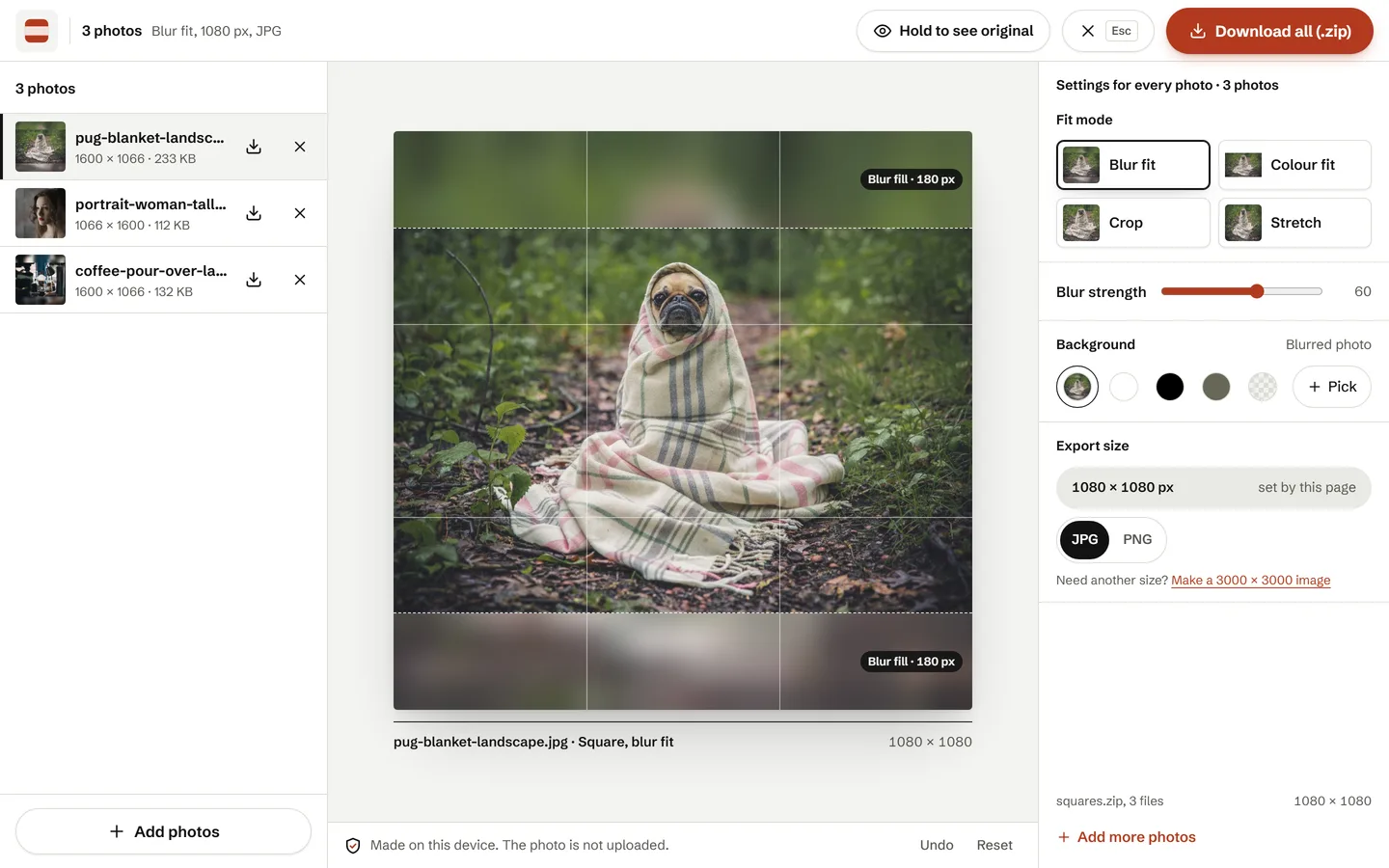
Which photos open, and which files you save
What image files work for 1080x1080 resizing?
JPG, PNG, WebP and AVIF photos work for 1080x1080 resizing in current browsers. HEIC, the iPhone format, opens only where the browser decodes it itself, such as Safari.
On an iPhone, the photo picker hands Safari a JPEG copy, so HEIC rarely gets in the way. Elsewhere the tool names the format and asks for JPG or PNG.
What you get back
Photos up to 100 megapixels open. Each square is saved as JPEG (.jpg) or PNG (.png) at 1080 × 1080, named after the photo with -square added.
A photo called canoe.jpg comes back as canoe-square.jpg. The original file on your device is never changed.
Your photo stays in this browser
Is resizing to 1080x1080 safe and private?
Yes, resizing to 1080x1080 here is private. The photo is drawn on an HTML canvas element in your browser, saved from there, and never uploaded.
No account is needed, and the tool is free. The square you download is made by your own device, from your own copy of the photo.
How to check it yourself
Open your browser's DevTools, choose the Network tab, then make a square. Watch for any request that carries the photo out.
When we did this, the log showed 4 script requests while the editor opened, 0 uploads and 0 bytes of the photo sent.
1080 against 2048 and 3000 px squares
Pick 1080 × 1080 for social feeds, where it is the width Instagram keeps.
Pick a bigger square only when it will be printed, zoomed or shown on a large screen.
| Square | Pixels | Megapixels | Print at 300 DPI | Best for |
|---|---|---|---|---|
| 1080 × 1080 | 1,166,400 | 1.17 | 3.6 in, 9.14 cm | Instagram and other social feeds |
| 2048 × 2048 | 4,194,304 | 4.19 | 6.83 in, 17.34 cm | Large and high-density screens |
| 3000 × 3000 | 9,000,000 | 9.00 | 10 in, 25.4 cm | Prints up to 10 inches and zoomed shop photos |
A 3000 × 3000 square has nearly eight times the pixels of 1080 × 1080, and a phone photo has enough for it.
To print or zoom, make a 3000x3000 image instead.
2048 × 2048 sits between the two. The main square image maker offers it, along with any custom size from 100 to 3000 px.
SquareFitImage and other 1080 x 1080 resizers compared
We ran the same three photos through toolvona.com, imageresizer.work and this tool on 24 November 2026, at each tool's default settings, and kept the downloads.
| Feature | SquareFitImage | toolvona.com | imageresizer.work |
|---|---|---|---|
| Opens as | Fit, blurred bands | Fit, white bands | Centre crop |
| Fill options | Blur, white, black, sampled, any colour, clear | Any colour | None, crop only |
| Other modes | Crop, Stretch | Crop to Fill, Stretch | Drag the crop |
| Output size | 1080 × 1080, set by the page | Any width and height | Any width and height |
| Save as | JPG, PNG | JPG, PNG, WebP | JPG by default |
| Several photos | Up to 30, one ZIP | Picker takes several | One at a time |
| Request bodies sent in our run | None | None | 120 KB to Microsoft Clarity |
| Canoe, 1600 × 1066 | 148.2 KB | 137.0 KB | 161.2 KB |
| Portrait, 1066 × 1600 | 136.1 KB | 131.0 KB | 159.3 KB |
| Teapot, 1600 × 1044 | 142.8 KB | 130.4 KB | 148.0 KB |
Where they do better: toolvona.com saves WebP and takes any width and height.
imageresizer.work opens more formats, including HEIC, BMP, GIF and TIFF, and can aim for a target file size.
imageresizer.work sent a 120 KB compressed request to Microsoft Clarity, an analytics service, right after our photo was chosen. We could not tell what it held.
In our own exports, white bands gave the lightest JPG and a full crop the heaviest. The same pattern shows across the three tools.
1080 × 1080 questions
Yes, enlarging a small photo to 1080 × 1080 makes it softer, because enlarging adds pixels but no detail.
A 320 px photo scored 0.536 to 0.595 SSIM in our test, where 1.0 would be identical to a true 1080 px square.
Shrinking a larger photo down to 1080 keeps it sharp. The editor names the enlargement, such as Enlarged 3.4×, before you save.
No, a square larger than 1080 pixels gains nothing on Instagram. Instagram sizes a larger photo down to a width of 1080 pixels, its Help Center says.
We read that page on 24 November 2026. A 1080 × 1080 file is already the width Instagram keeps, so it is not resized again.
Yes, you can print a 1080 × 1080 image up to 3.6 × 3.6 inches (9.14 cm) at 300 DPI, the usual setting for sharp photo prints.
For a larger print, make a 3000x3000 image instead. That prints at 10 inches (25.4 cm) at 300 DPI.
No, 1080 × 1080 is not 1080p. 1080p is a 1920 × 1080 video frame, a 16:9 shape. Both are 1080 pixels high, but 1080 × 1080 is square.
A 1920 × 1080 screenshot fits into the square at 1080 × 608, with 236 px bands above and below.
A 1080 × 1080 image is 1,166,400 pixels, about 1.17 megapixels. A 12 megapixel phone photo has roughly ten times as many.
That is why a phone photo always shrinks to fit 1080 × 1080, and never needs enlarging.