Instagram square post size: 1080 × 1080
An Instagram square post is 1080 × 1080 pixels, a 1:1 aspect ratio. Instagram also takes portrait posts at 1080 × 1350 and landscape posts at 1080 × 566. The profile grid on instagram.com shows each post as a 3:4 tile, which leaves out the left and right edges of a square.
Starting from a photo of another shape? Make a 1080x1080 image in your browser, kept whole or cropped.
| Post shape | Ratio | Pixels | In the profile grid |
|---|---|---|---|
| Square | 1:1 | 1080 × 1080 | 135 px off each side |
| Portrait | 4:5 | 1080 × 1350 | 34 px off each side |
| Tall portrait | 3:4 | 1080 × 1440 | Fills the tile |
| Landscape | 1.91:1 | 1080 × 566 | 328 px off each side |
Source: the Instagram Help Center gives 1080 px wide and 566 to 1440 px tall. Grid figures are arithmetic for a centred 3:4 tile, not measured on posted images.
What size is an Instagram square post in pixels?
An Instagram square post is 1080 × 1080 pixels at a 1:1 aspect ratio. Instagram keeps photos up to 1080 pixels wide, and a square is equally tall.
A pixel is one dot of colour in a digital image. Aspect ratio is an image's width compared with its height, written width:height, so 1080:1080 reduces to 1:1.
The Instagram Help Center, published by Instagram owner Meta Platforms, names no square size. 1080 × 1080 is the 1:1 shape at the widest width Instagram keeps.
"When you share a photo that has a width between 320 and 1080 pixels, we keep that photo at its original resolution…"
"…as long as the photo's aspect ratio is between 1.91:1 and 3:4 (a width of 1080 pixels with a height between 566 and 1440 pixels)."
Profile photos follow different rules from feed posts. For those, see square profile picture sizes by platform.
Is 1080x1080 a square?
Yes, 1080x1080 is a square, because its width and height are both 1080 pixels. Any image with equal sides is a square, whatever its pixel count.
Is 1:1 the same as 1080x1080?
No, 1:1 is not the same as 1080x1080. 1:1 is a shape and 1080 × 1080 is one size of it, like 320 × 320 or 3000 × 3000.
Other sites expect other square sizes. The list of every common square image size gives each one with its source.
How does Instagram scale a square upload?
Instagram scales a square upload to between 320 and 1080 pixels wide, according to the Instagram Help Center. A square already inside that range keeps its own size.
A larger square, such as 2048 × 2048, is sized down to 1080 × 1080. A smaller one, such as 200 × 200, is enlarged to 320 × 320.
"If you share a photo at a lower resolution, we enlarge it to a width of 320 pixels."
"If you share a photo at a higher resolution, we size it down to a width of 1080 pixels."
Uploading a square larger than 1080 px gains nothing in size, because Instagram keeps 1080 px at most. It does no harm either, going by the Help Center wording.
Which file formats can you upload to an Instagram post?
You can upload JPG, PNG and HEIC/HEIF files to an Instagram post. The Help Center's post a photo page says: "The supported file formats are jpg, png and heic/heif."
JPEG, saved as .jpg, is the usual format for photos because it keeps files small. Our square tool saves JPG at quality 92 unless you pick PNG.
Why does Instagram always crop my photos?
Instagram crops a photo whose aspect ratio falls outside 1.91:1 to 3:4, the Help Center range. A 9:16 phone screenshot is taller than 3:4, so it is cropped.
The Help Center puts it plainly: "If the aspect ratio of your photo isn't supported, it will be cropped to fit a supported ratio."
A photo inside the range can still look cut on your profile, because the profile grid shows a 3:4 tile.
Why do square posts look cropped in the 3:4 profile grid?
Square posts look cropped in the profile grid because each tile is 3:4, narrower than a square. A 1080 × 1080 post keeps its height but loses both side strips.
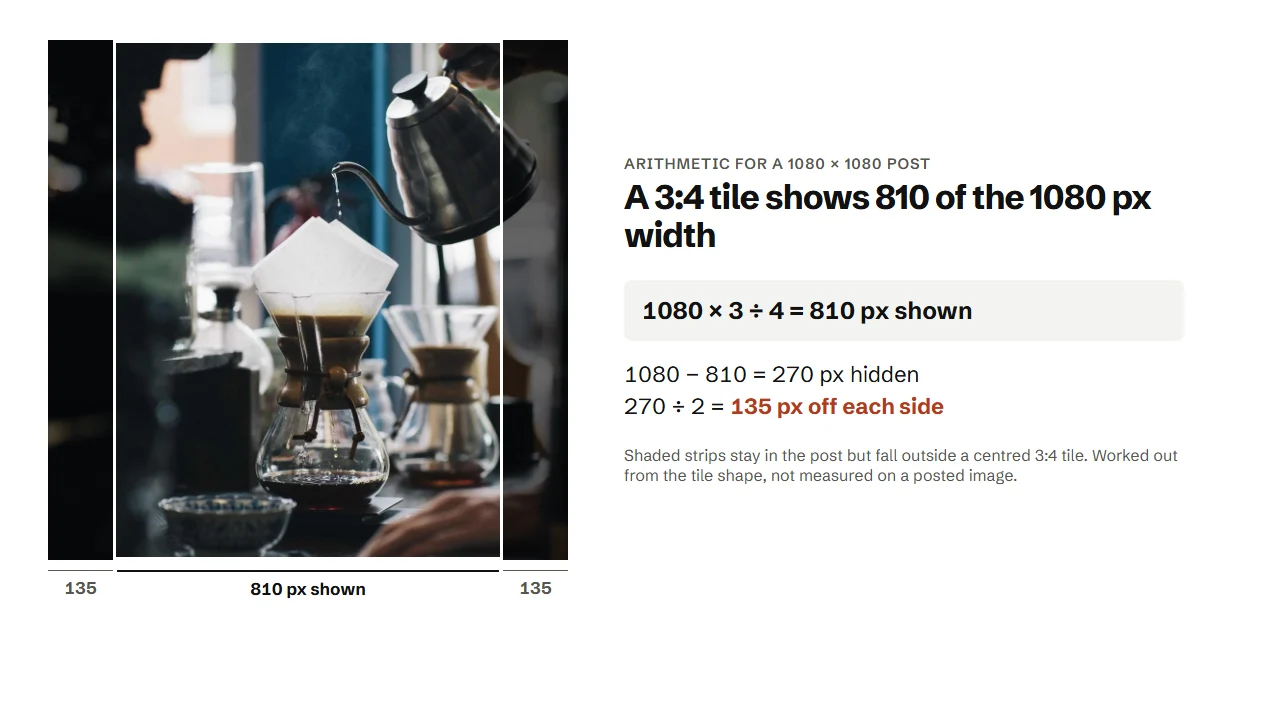
Worked out, not measured
shown width = post height × 3 ÷ 4
For a 1080 × 1080 square, the tile shows 1080 × 3 ÷ 4 = 810 px of width. The other 270 px split into 135 px off each side.
| Post | Shown width | Hidden per side |
|---|---|---|
| 1080 × 1080 | 810 px | 135 px |
| 1080 × 1350 | 1012.5 px | 33.75 px |
| 1080 × 1440 | 1080 px | 0 px |
| 1080 × 566 | 424.5 px | 327.75 px |
Is the new Instagram grid 4:5 or 3:4?
The new Instagram grid is 3:4, not 4:5, on instagram.com. We measured 4 post tiles on a public profile at 310.67 × 414.22 CSS pixels each.
| Measure | Result |
|---|---|
| Tile size | 310.67 × 414.22 CSS px |
| Width ÷ height | 0.750, so 3:4 |
| How the image fills it | Scaled to cover, centred at 50% 50% |
| Image files served | 512 × 640 and 480 × 640 |
Those image files were 4:5 and 3:4 posts by other people. The phone app was not checked, and at 390 px wide the site showed a login screen instead.
What is the Instagram grid size in 2026?
The Instagram grid size in 2026 is a 3:4 tile. The Instagram Help Center pages we read give no pixel size for profile grid tiles.
A post that fills a tile exactly is 1080 × 1440, a 3:4 shape. It is also the tallest post the Help Center allows.
We have not yet posted a ruler image to our own account to read which edges the grid hides. Until that test runs, the 135 px figure stays arithmetic.
Square vs 4:5, 3:4 and 1.91:1 Instagram posts
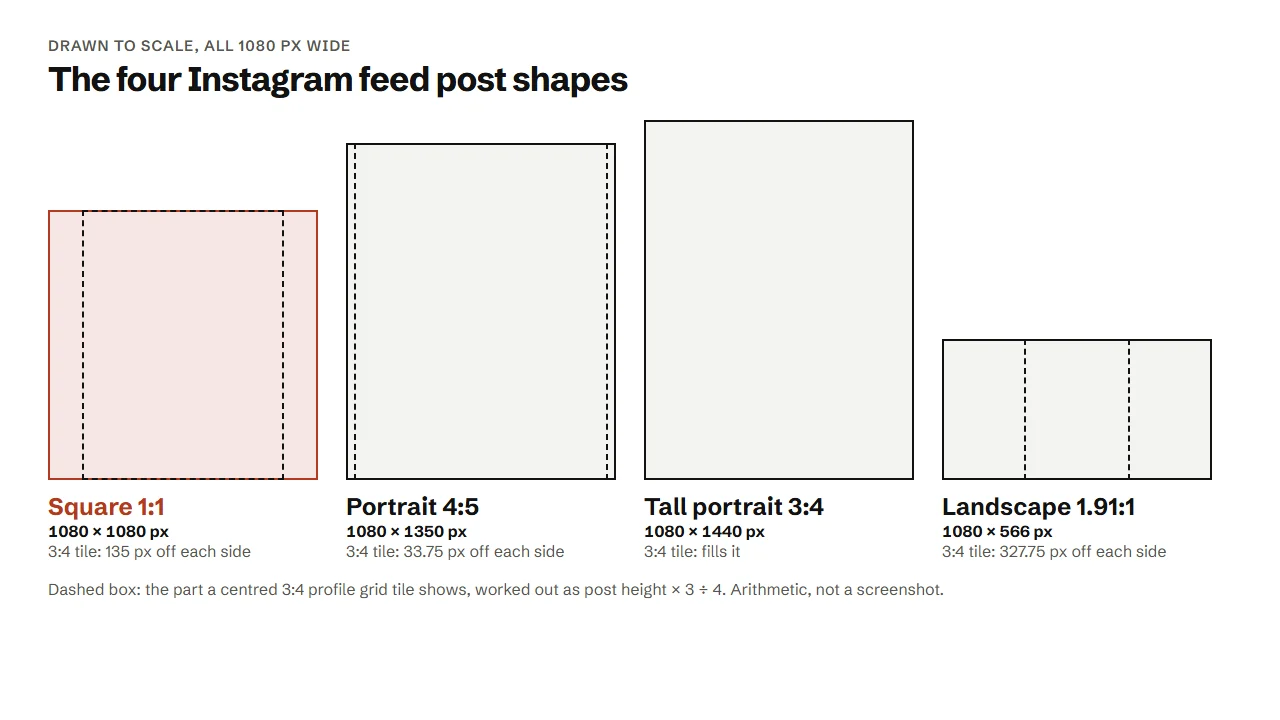
A square post is the middle shape: shorter than a 4:5 or 3:4 portrait, and taller than a 1.91:1 landscape. All four Instagram post shapes are 1080 pixels wide.
| Shape | Ratio | Pixels | Pixels vs a square | In the profile grid |
|---|---|---|---|---|
| Square | 1:1 | 1080 × 1080 | 100% | 135 px off each side |
| Portrait | 4:5 | 1080 × 1350 | 125% | 34 px off each side |
| Tall portrait | 3:4 | 1080 × 1440 | 133% | Fills the tile |
| Landscape | 1.91:1 | 1080 × 566 | 52% | 328 px off each side |
Is an Instagram post square or 4:5?
An Instagram post can be square or 4:5, and also 3:4 or 1.91:1. At the same 1080 px width, a 4:5 post holds 25% more pixels than a square.
What are the Instagram post dimensions for a full photo?
The Instagram post dimensions for a full photo are 1080 pixels wide and 566 to 1440 pixels tall. A photo inside that range posts whole, says the Help Center.
What Instagram aspect ratio shows the full photo?
Any Instagram aspect ratio from 1.91:1 to 3:4 shows the full photo. Outside that range, pad the photo to 1:1 or 4:5 so nothing is cut.
How much of a 3:2 camera photo does each shape keep?
A centred crop of a 1600 × 1066 camera photo keeps 67%, 53%, 79% as a square, 4:5 and 1.91:1 post.
Worked example: a 4032 × 3024 phone photo made square
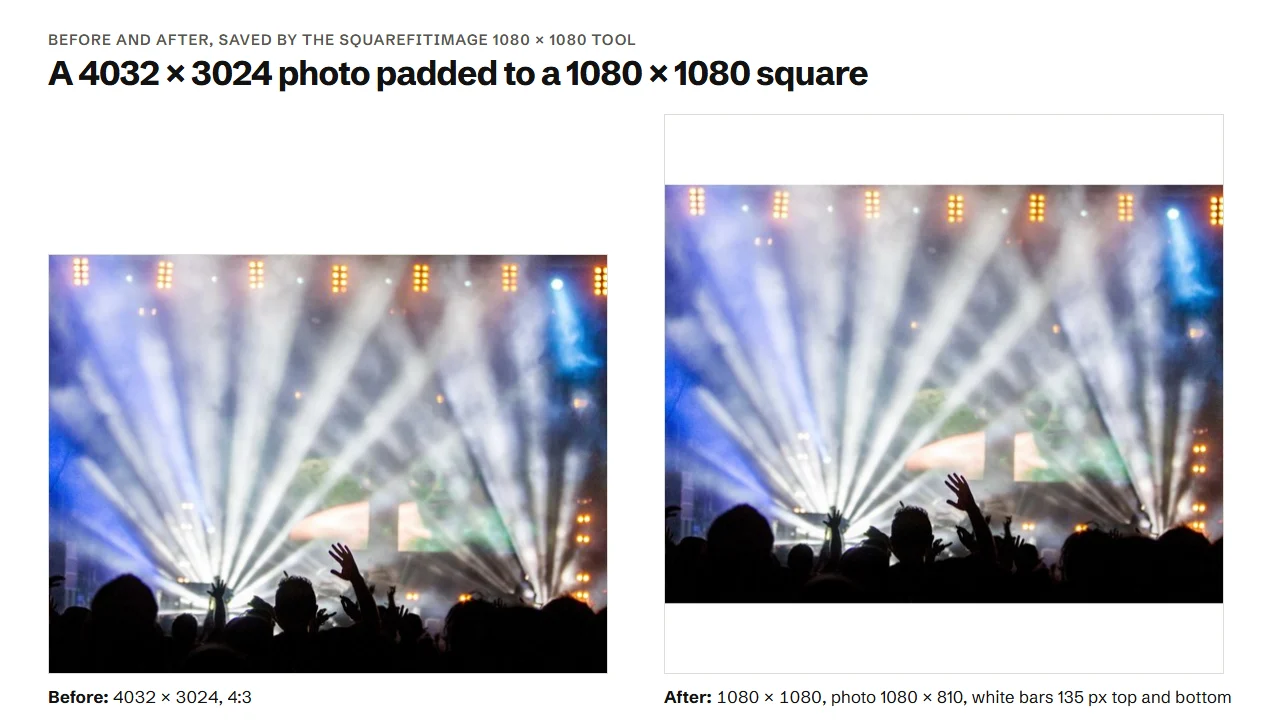
A 4032 × 3024 phone photo made square without cropping becomes 1080 × 1080, with the photo at 1080 × 810 and 135 px bars above and below.
There are 3 steps in the arithmetic, from the full-size photo to the 1080 px post:
- Pad the photo to 4032 × 4032: (4032 − 3024) ÷ 2 = 504 px of bar above and below.
- Scale by 1080 ÷ 4032: the photo becomes 1080 × 810, and each bar becomes 504 × 1080 ÷ 4032 = 135 px.
- Save at 1080 × 1080, the square size Instagram keeps without scaling.
| Fill | Saved file | File size | Bars measured |
|---|---|---|---|
| White fill | 1080 × 1080 | 179 KB | 135 px top, 135 px bottom |
| Blur fill | 1080 × 1080 | 186 KB | Not counted (blurred edge) |
The empty space is padding (letterbox and pillarbox bars). Letterbox bars sit above and below a wide photo; pillarbox bars sit at the sides of a tall one.
To keep the mood of the photo, fill the bars with blur. For products and shop photos, add a white border instead.
How to resize images to fit an Instagram post
To resize images to fit an Instagram post, pad each to 1:1 or 4:5 at 1080 px wide and upload that file. Nothing is cropped, because the shape fits.
The Instagram tool on this site does both shapes in your browser. Use it to fit your photo without cropping, one photo or a whole carousel.
What did Instagram serve back in our upload test?
Nothing yet: our upload test has not been run. It needs a real Instagram account, and this section will hold the measured sizes once the posts are live.
The plan is to post squares at 640, 1080, 2048 and 4000 px, plus a 4032 × 3024 photo, from the Instagram app to a test account, with no filters.
Each post will then be opened on instagram.com in Chrome DevTools at 1440 and 390 px wide, to read the served image's pixel size, format and file size.
Until then, the table applies the Instagram Help Center's sizing rule to each test file. It is a prediction from the wording, not a measurement.
| File to upload | Predicted post size | Rule applied | Measured |
|---|---|---|---|
| 640 × 640 | 640 × 640 | Kept at its own size | Not run yet |
| 1080 × 1080 | 1080 × 1080 | Kept at its own size | Not run yet |
| 2048 × 2048 | 1080 × 1080 | Sized down to 1080 px wide | Not run yet |
| 4000 × 4000 | 1080 × 1080 | Sized down to 1080 px wide | Not run yet |
| 4032 × 3024 | 1080 × 810 | Sized down to 1080 px wide | Not run yet |
Do all photos in an Instagram carousel use the same aspect ratio?
Yes, all photos in an Instagram carousel use the same aspect ratio. The Instagram Help Center says the orientation you choose applies to every photo or video in the post.
"Keep in mind that the orientation you choose (square, portrait or landscape) affects all of the photos or videos in your post."
"You can't select a different orientation for each photo or video."
A carousel post holds up to 20 photos and videos. Pad every slide to one shape first, so a tall photo is not cut to fit a square set.
We read this rule in the Help Center's computer instructions. We have not checked the carousel screen in the phone app ourselves.
Other posting rules are in the Instagram Help Center, which Meta Platforms publishes.
What is the Instagram square size in inches and cm?
An Instagram square has no fixed size in inches or cm: pixels have no physical size. At 300 dots per inch (DPI), 1080 px prints at 3.6 in (9.14 cm).
DPI here means printer dots per inch, the print density. Inches = pixels ÷ DPI, and centimeters = inches × 2.54.
At 96 DPI, a common screen reference, the same 1080 px square measures 11.25 in (28.58 cm) on each side.
| Density | Inches per side | Centimeters per side |
|---|---|---|
| 300 DPI | 3.6 in | 9.14 cm |
| 96 DPI | 11.25 in | 28.58 cm |
Should you still post square in 2026?
Yes, post square in 2026 when the photo is already square or the subject sits centrally, as in product shots and logo grids. Choose 4:5 for everything else.
Keep faces in the middle three quarters
The profile grid shows the centre 75% of a square's width. A face near the edge looks cut off on your profile, though the full post is fine.
Choose 4:5 for more of the feed
A 1080 × 1350 portrait has 25% more pixels than a square. In the grid it loses only about 34 px per side, by arithmetic.
Fit wide photos instead of cropping
A 3:2 landscape cropped to a square keeps 67% of its area. Fitting it on a blurred or white square keeps every pixel.
Post the whole photo
Instagram crops anything outside its shapes. Fit the photo into a square or 4:5 first, and nothing is lost.
Questions about the Instagram square size
A 3000 × 3000 square uploaded to Instagram is sized down to 1080 × 1080. The Instagram Help Center says higher-resolution photos are sized down to 1080 pixels wide.
Our own upload test has not been run yet, so this is the Help Center's rule applied to a square, not a measured result.
A square smaller than 320 px is enlarged to 320 × 320. The Instagram Help Center says a lower-resolution photo is enlarged to 320 pixels wide.
Enlarging adds no detail, so a tiny square looks soft. Start from the largest copy of the photo you have.
A square post looks cut off on your profile because the profile grid shows a 3:4 tile, which is narrower than a square of the same height.
By arithmetic, a 3:4 tile over a 1080 × 1080 post shows 810 px of its width and leaves 135 px out on each side.