Square profile picture maker
Make a square profile picture with a circle guide, so your face sits inside the round avatar every platform draws. Nothing is uploaded.
Drop a photo here
or paste it. JPG, PNG, WebP. Several at once is fine.
Never uploaded: it all runs in your browser.

Freeno account, no watermark
Privatefiles stay on your device
3000 pxlargest preset export
Batchmany photos, one ZIP
A square profile picture is a 1:1 image that a platform shows inside a circle or a square. This maker crops your photo with a circle guide.
The guide keeps your face inside the round avatar. The square JPG or PNG is saved in your browser, and the photo is never uploaded.
The editor sets the export size, from 100 to 3000 px.
For posts and shop photos, see every common square image size, or read what a 1:1 aspect ratio means.
Looking for a drawn "square face" character? This tool fits a real photo and doesn't generate avatars.
How much of a square profile picture does the circle hide?
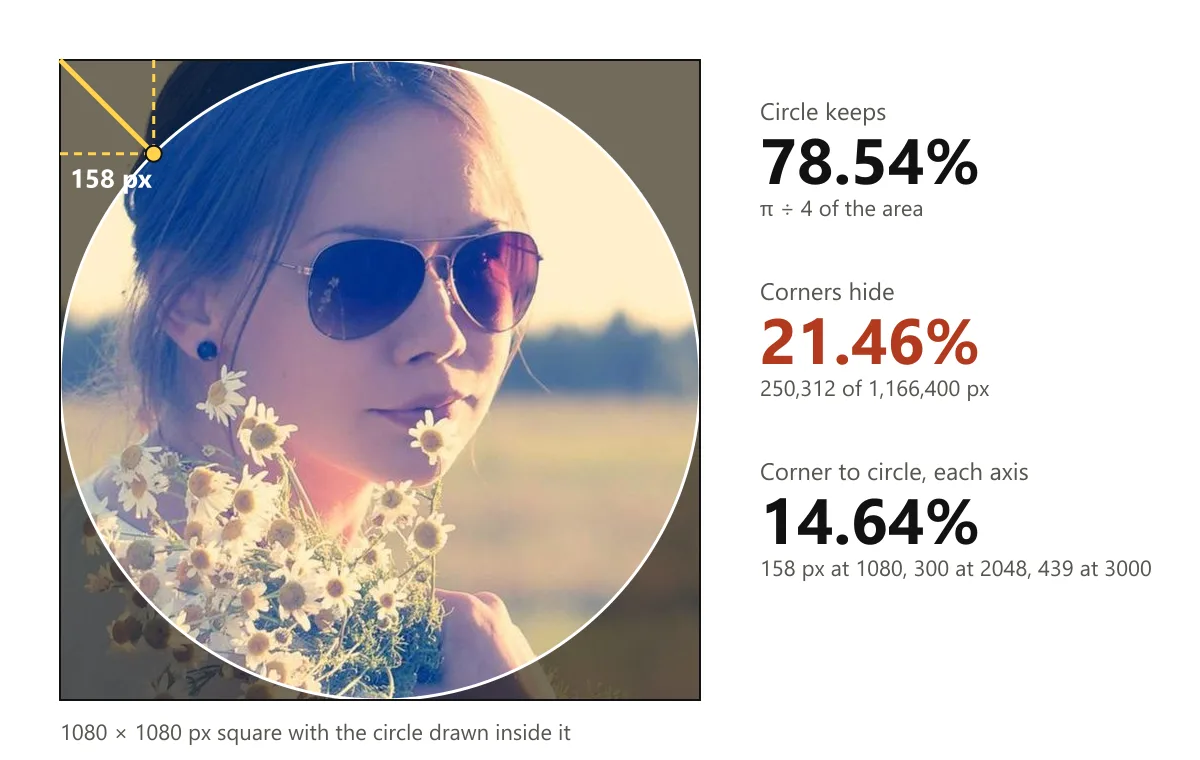
A circle drawn inside a square profile picture hides 21.46% of its area, all in the four corners. The circle keeps the other 78.54%, which is π ÷ 4.
On the diagonal, the circle edge sits 14.64% of the side in from each corner, on both axes. In a 1080 px square that is 158 px.
AI answers often say the outer 15% of the corners is invisible. That figure matches the 14.64% inset along each edge, not the share of area, which is 21.46%.
Geometry calls this the inscribed circle (circle mask): the largest circle that fits the square, touching all four sides at their midpoints. The editor's circle guide draws exactly that circle.
Wikipedia files the small picture next to your name under avatar (computing). A platform cuts that avatar from your square upload, so the corners are the part at risk.
| Square | Hidden pixels | Corner to circle, each axis | Corner to circle, diagonal | Safe square |
|---|---|---|---|---|
| 400 × 400 px | 34,336 of 160,000 | 59 px | 83 px | 283 × 283 px |
| 800 × 800 px | 137,345 of 640,000 | 117 px | 166 px | 566 × 566 px |
| 1080 × 1080 px | 250,312 of 1,166,400 | 158 px | 224 px | 764 × 764 px |
| 2048 × 2048 px | 900,105 of 4,194,304 | 300 px | 424 px | 1448 × 1448 px |
| 3000 × 3000 px | 1,931,417 of 9,000,000 | 439 px | 621 px | 2121 × 2121 px |
Profile picture sizes on 8 platforms
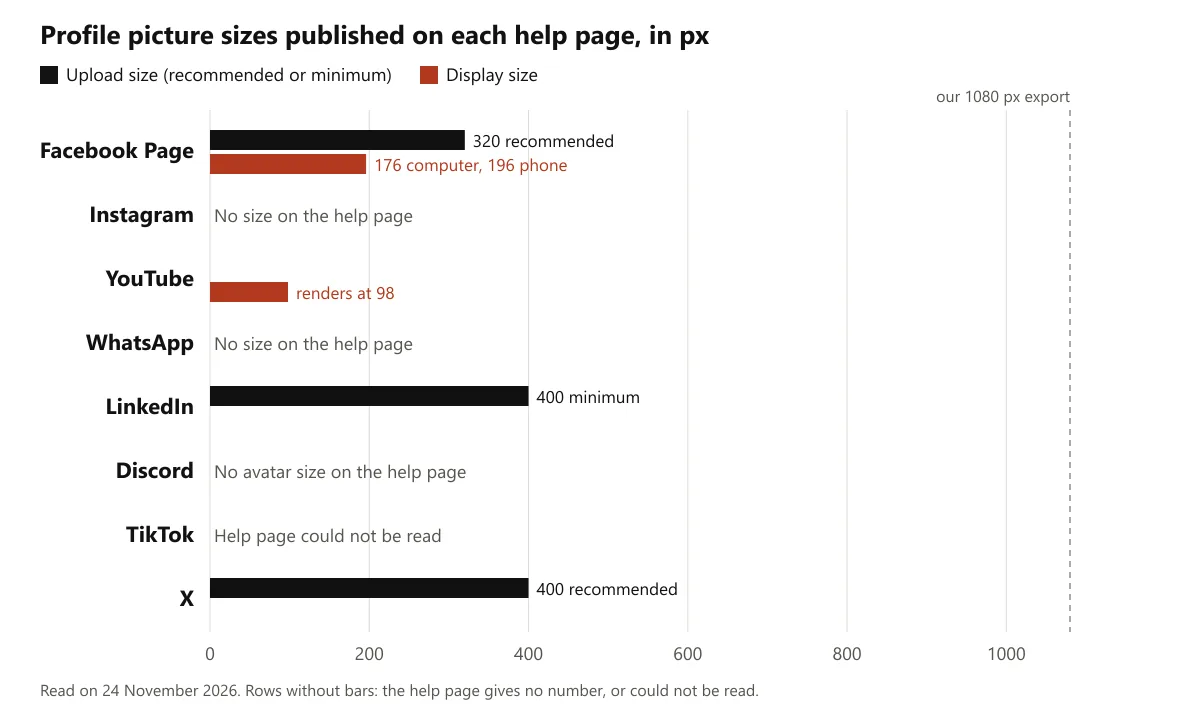
Only 4 of the 8 platforms publish a profile picture size on their own help page: Facebook, YouTube, LinkedIn and X. We read every help page on 24 November 2026.
| Platform | Upload size | Minimum | Display size | Shape | File rules | Source |
|---|---|---|---|---|---|---|
| 320 × 320 px | Not published | 176 × 176 px computer, 196 × 196 px phone | Circle | PNG for a logo or text | Facebook Page profile picture and cover photo dimensions | |
| Not published | Not published | Not published | Not published | Not published | Add a profile picture or change your current picture on Instagram | |
| YouTube | Not published | Not published | 98 × 98 px | Not published | JPG, GIF, BMP or PNG, 15 MB or less | Manage your channel branding |
| Not published | Not published | Not published | Not published | Not published | How to edit your profile | |
| Not published | 400 × 400 px (largest 7680 × 4320 px) | Not published | Not published | PNG or JPG, 8 MB or less | Photo won't upload to your profile | |
| Discord | Not published | Not published | Not published | Not published | Animated GIF with Nitro | Custom Profiles |
| TikTok | Help centre could not be reached | |||||
| X | 400 × 400 px | Not published | Not published | Not published | JPEG, GIF or PNG, 2 MB or less | Help with uploading a profile photo |
What is the Facebook profile picture size in pixels?
Facebook's help page says a Page profile picture should be 320 × 320 pixels for best quality.
Facebook displays that picture at 176 × 176 px on computers and 196 × 196 px on smartphones.
That page covers Facebook Pages. Facebook's article on changing a personal profile picture, read the same day, gives no size.
What aspect ratio is an FB profile photo?
A Facebook profile photo has a 1:1 aspect ratio, because 320 × 320 pixels is a square. Facebook's help page adds that the picture "is cropped to a circle".
What size should a Discord, Instagram or LinkedIn profile picture be?
LinkedIn's help page gives the only number of the three: at least 400 × 400 pixels and at most 7680 × 4320 pixels.
LinkedIn also asks for a PNG or JPG of 8 MB or less.
The Instagram and Discord help pages publish no profile picture size, and neither does WhatsApp's. TikTok's help centre could not be reached from our network on 24 November 2026.
X recommends 400 × 400 pixels, and YouTube says its picture renders at 98 × 98 px. A 1080 px square is larger than every published size here.
For feed posts, see Instagram square post size explained.
Which sizes does this tool save?
This tool has no per-platform presets. The size buttons under the drop box offer 400, 800 and 1080 px, and the editor offers 1080, 2048 or 3000 px.
The editor's Custom box takes any size from 100 to 3000 px. To match one platform exactly, type its number; to make a 1080x1080 image, use the default.
A pixel is one dot of colour in the image. Image scaling (downsampling) is the step where a platform shrinks a large upload to its display size, discarding pixels.
Where to put your face inside the circle guide
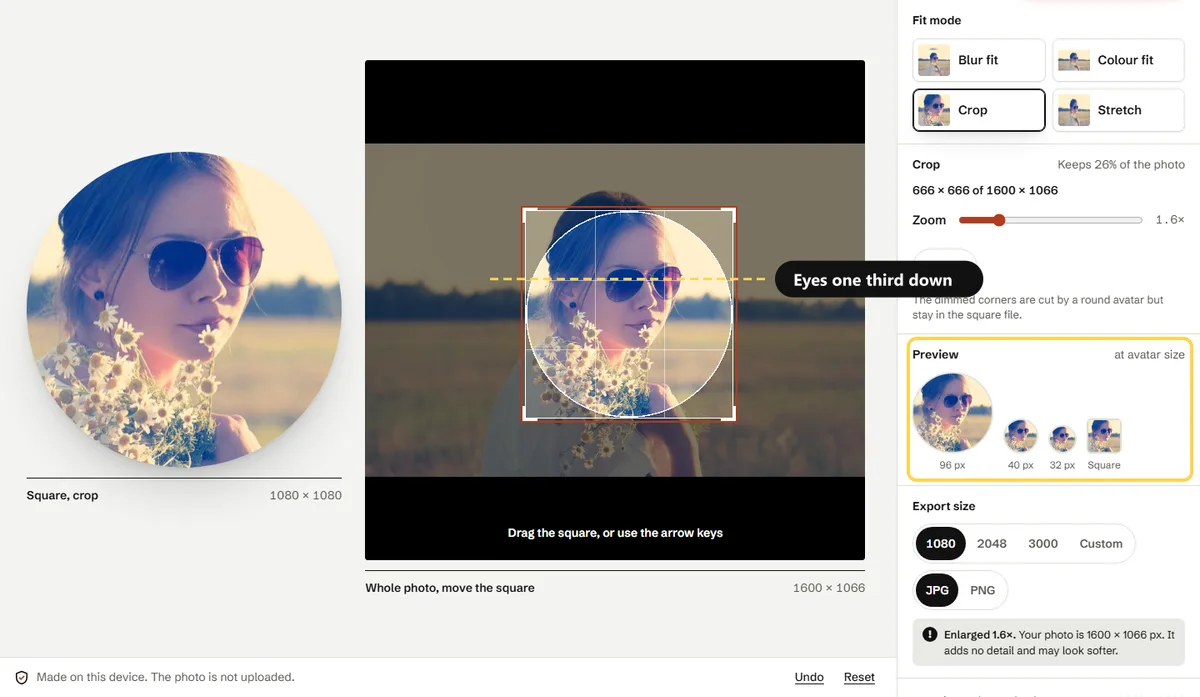
Center your eyes about one third down the circle, and keep your face inside the middle 764 × 764 px of a 1080 px square.
That middle square never touches the circle edge.
How much margin should I leave between my face and the circle edge?
Leave at least 14.64% of the side clear at each edge for anything that must show, such as hair, ears or a hand.
In a 1080 px square, that margin is 158 px.
That middle area is the safe zone: the largest square inside the circle, 764 px wide in a 1080 px square.
Anything in the safe zone shows in a circle, a rounded square and a plain square.
We have not yet checked which platforms show a rounded square instead of a circle. The ruler upload test will settle it; the safe zone already covers both shapes.
How do I make a square profile picture fit inside the circle?
To make a square profile picture fit inside the circle, choose Crop with circle and drag the square onto your face.
Then use Zoom until your head fills most of the circle.
The arrow keys move the square 1 px, and Shift with an arrow moves it 10 px.
Previews at 96, 40 and 32 px show the avatar at the sizes people see.
The dimmed corners stay in the saved file.
The note under the crop controls reads: "The dimmed corners are cut by a round avatar but stay in the square file."
Keep a wide photo whole with blur or colour
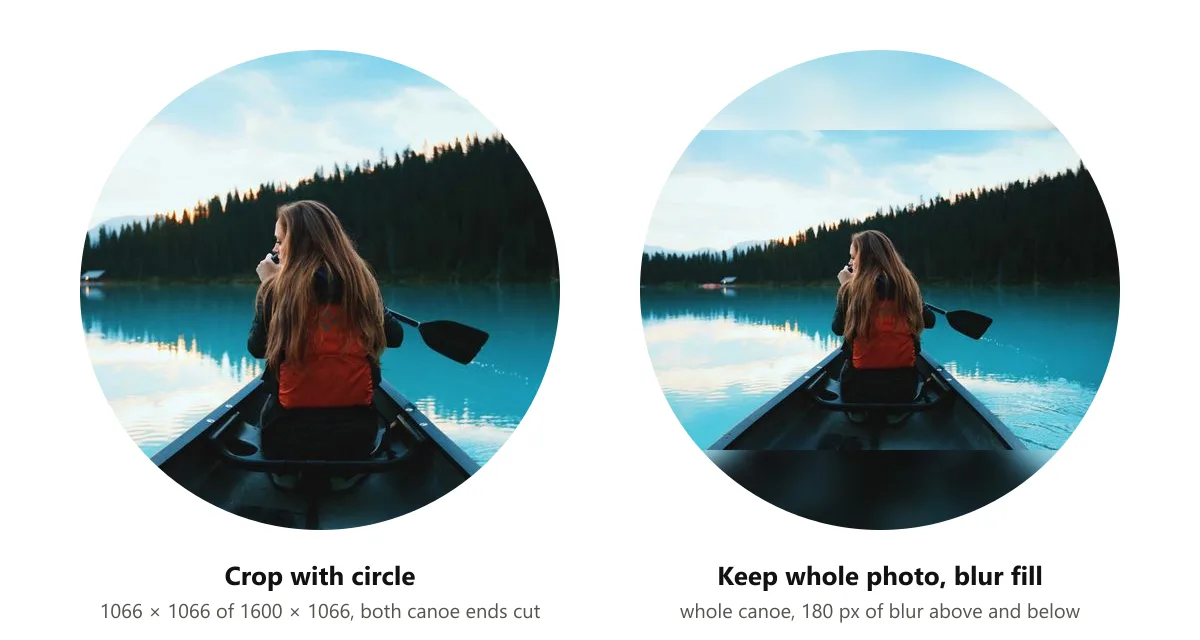
To keep a wide photo whole, choose Keep whole photo.
The tool fits the full photo in the square and fills the empty bands with a blurred copy or a colour.
How to get a Facebook profile pic to fit?
To get a Facebook profile pic to fit, make it square before uploading. Crop with circle if the face matters most, or keep the whole photo with a blur fill.
On our canoe photo, cropping kept 1066 × 1066 pixels, 67% of the photo, and cut both ends of the canoe.
The whole-photo square kept everything, with 180 px of blur above and below.
The trade-off shows at avatar size: in the whole-photo square the canoe photo is only 720 px tall, so a face in it is smaller than in a close crop.
You can also fill the empty edges with blur at more strengths, add a plain white border, or crop any photo to a square without the circle.
What each platform showed in our upload test
The platforms have shown nothing yet, because our upload test on the 8 platforms has not been run.
This page shows no platform screenshots and claims no served sizes until the test is done.
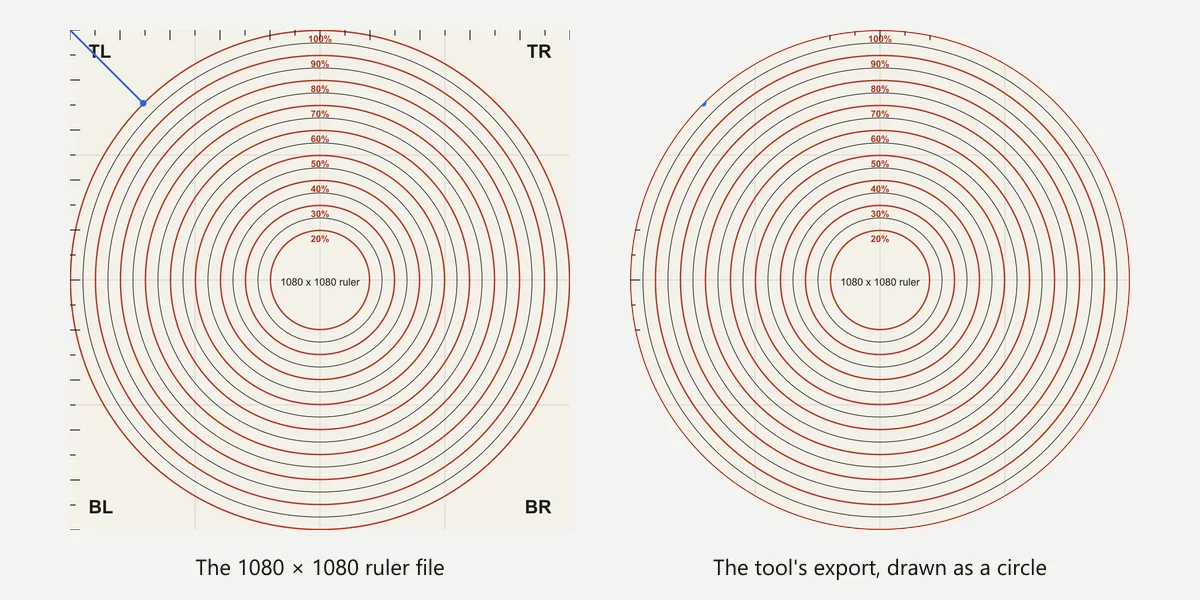
The test file is a 1080 × 1080 ruler with rings every 5% of the side, corner labels and a blue mark at the 158 px corner inset.
Method: set the ruler as the profile picture on a test account, screenshot the profile at 390 and 1440 px wide, and note the outermost ring that stays whole.
Then read the served image's natural size, format and transfer size in Chrome DevTools. Same file, same day, on all 8 platforms, so anyone can repeat it.
The ruler went through this tool unchanged: Crop with circle at Zoom 1× returned the full 1080 × 1080 square as a 491.7 KB PNG.
Why a profile picture looks blurry after upload
A profile picture looks blurry when the photo was enlarged before upload, or when the platform shrinks and re-saves it.
We measured the first cause; the second needs the upload test.
Enlarging adds pixels, not detail
In our test, a 666 px crop of a 1600 × 1066 portrait saved at 1080 px was enlarged 1.6×. The editor warned "Enlarged 1.6×" before saving.
Zoom shrinks the square. At 4×, the square on the same photo is 267 px, so a 1080 px export would be enlarged about 4.0×.
To avoid it, zoom less or pick a smaller export. The 400 px export of the same 666 px crop needed no enlargement at all.
Platforms show the picture small
Facebook shows a Page profile picture at 176 px on a computer, so a 1080 px file is shrunk about 6.1×. YouTube says its picture renders at 98 px.
Facebook's help page also says a PNG may give a better result for a logo or text. We have not yet measured how each platform re-compresses an upload.
Should you export a profile picture as JPG or PNG?
Export a profile picture as JPG if it is a photo, and as PNG if it is a logo or text.
In our test, the PNG of the same portrait was 8.8 times larger than the JPG.
| Square | JPG, KB | PNG, KB | PNG ÷ JPG |
|---|---|---|---|
| 400 × 400 px | 41.2 | 282.1 | 6.9× |
| 800 × 800 px | 114.6 | 936.8 | 8.2× |
| 1080 × 1080 px | 173.2 | 1527.1 | 8.8× |
JPEG (JPG) is a lossy format: the tool saves it at quality 92, which drops fine detail the eye rarely misses. PNG is lossless and keeps every pixel exactly.
Size limits matter. X caps a profile photo at 2 MB and LinkedIn at 8 MB. The 1080 px PNG, at 1527.1 KB, fits both, and YouTube allows 15 MB.
The tool always saves a full square, so its PNG has no clear corners. Whether platforms keep PNG transparency is not tested yet; the upload test will record it.
Circle croppers compared on one off-center portrait
We tried 4 circle croppers with the same off-center portrait on 24 November 2026, and 2 of them stopped our test browser before any crop.
| Feature | SquareFitImage | circlecropimage.com | Photoroom | Canva |
|---|---|---|---|---|
| Move the circle | Yes, drag or arrow keys | Yes, drag | Not reached | Not reached |
| Zoom | 1× to 4× | Yes, slider | Not reached | Not reached |
| Keep the whole photo | Yes, blur or colour fill | Yes, Fit mode | Not reached | Not reached |
| Saved file | Square | Round PNG, clear corners | Not reached | Not reached |
| Output size | 100 to 3000 px | The crop's own size, 1066 px here | Not reached | Not reached |
| Formats | JPG, PNG | PNG; its page adds WebP, JPEG | Not reached | Not reached |
| Photo sent to a server | No request carried it | No request carried it | Not reached | Not reached |
| Watermark or sign-up | None | None seen | Not reached | Not reached |
| What stopped the test | Nothing | Nothing | A Verify you are human check | A block page in its editor |
Where they do better: circlecropimage.com saves a round PNG with clear corners at the photo's own resolution, and its page lists WebP. This tool saves a square only.
Photoroom's page says the background of your photo is removed; this tool doesn't remove backgrounds. In our test, choosing the photo brought up a Verify you are human check.
Canva's circle crop page has no file box of its own. Its button opened Canva's editor, which showed a block page to our test browser.
No Canva cell could be checked.
circlecropimage.com showed an ad bar along the bottom of the page during the test.
Square profile picture questions
Upload a square profile picture, because a platform such as Facebook crops it to a circle itself.
A square file keeps its corners, so nothing is lost where a picture shows as a square.
A round PNG with clear corners is another option, but we have not yet tested how each platform treats the clear corners.
No, you don't have to crop before uploading, because YouTube and LinkedIn, for example, offer their own crop.
Cropping first lets you see the circle at full size, with the face placed where you want it.
The circle guide here shows the cut corners and three avatar sizes before you save, so you see the result at the size people see it.
Every platform that takes a JPG or PNG profile picture is supported, because the tool saves an ordinary square file. There is no per-platform preset; you pick the size.
The size table on this page covers Facebook, Instagram, YouTube, WhatsApp, LinkedIn, Discord, TikTok and X, each from the platform's own help page.
A round profile picture is a square file that the platform shows as a circle.
Facebook recommends 320 × 320 px for a Page, and X recommends 400 × 400 px.
The circle is as wide as the square: in a 1080 px square it is 1080 px across and starts 158 px in from each corner on both axes.
To make your profile picture round, upload a square and let the platform crop it to a circle. You don't need a round file.
Use Crop with circle on this page to place your face inside the circle guide, then save the square and upload it.
To crop an Instagram profile picture, crop it to a square with the circle guide here, then upload it under Edit Profile and Change photo.
Keep your face inside the circle while you crop.
Instagram's help page names those steps but publishes no size, so save at 1080 px, which leaves room for any shrinking.
No, your photo doesn't leave the browser. The square is made on your device with the HTML canvas, and nothing is uploaded.
Our network log after choosing a photo shows 29 script downloads, 0 uploads and 0 bytes sent. Exports run from 100 to 3000 px.