1:1 aspect ratio
A 1:1 aspect ratio means an image's width equals its height, so the picture is a square. It is a shape, not a size: 500 × 500, 1080 × 1080 and 3000 × 3000 pixels are all 1:1. Cropping a 4:3 phone photo to 1:1 keeps 75% of it; padding keeps all of it.
1:1 next to other photo shapes, same height
- 1:1square
- 4:5portrait post
- 4:3phone photo
- 3:2camera photo
- 16:9HD video
What is a 1:1 image aspect ratio?
A 1:1 image aspect ratio means the picture is exactly as wide as it is tall. Every 1:1 image is a square, whatever its size in pixels.
Wikipedia's article on aspect ratio (image) defines aspect ratio as the ratio of an image's width to its height, written width:height.
The W3C CSS sizing specification uses the same idea for web pages: a box's preferred aspect ratio is its width divided by its height.
For a square, that division gives exactly 1. Here 1:1 always means the shape of a picture, not a one-on-one meeting or a scale model.
What is a 1 to 1 ratio?
A 1 to 1 ratio compares two equal amounts: one part of one thing for each part of the other. In an image, those amounts are width and height.
Is 1:1 the same as 4:4?
Yes, 1:1 is the same as 4:4, because both sides of 4:4 divide by 4 to give 1:1. 2:2, 4:4 and 1080:1080 all describe one square shape.
Ratios are usually reduced to their smallest whole numbers, which is why size guides and editors print 1:1 rather than 4:4.
Is 1:1 the same as 1080 × 1080?
Yes, 1080 × 1080 is a 1:1 size, but 1:1 is not only 1080 × 1080. Any image with equal width and height in pixels is 1:1.
A pixel is the smallest dot of colour in a digital image. Image resolution is the pixel count of an image, so a 1:1 shape can be tiny or huge.
| Square size | Pixel count | Megapixels |
|---|---|---|
| 1080 × 1080 | 1,166,400 | 1.17 MP |
| 2048 × 2048 | 4,194,304 | 4.19 MP |
| 3000 × 3000 | 9,000,000 | 9.00 MP |
The tool also takes a custom size from 100 to 3000 px. For a guide to which square pixel size to pick, start with where the image will be shown.
What is the best resolution for a 1:1 aspect ratio?
The best resolution for a 1:1 aspect ratio is the size the picture will be shown at, or larger. A bigger square keeps more detail, but sites may shrink it.
Instagram's Help Center (read 24 November 2026) says photos wider than 1080 pixels are shrunk to 1080 pixels wide.
So the Instagram square post size is 1080 x 1080 pixels.
For feeds, the 1080 × 1080 page saves that size directly. For print, shops and album art, the 3000 × 3000 page saves the largest preset.
How do you check whether a photo is 1:1?
To check whether a photo is 1:1, divide its width in pixels by its height. A result of exactly 1 means the photo is a 1:1 square.
width ÷ height = 1 → 1:1
To name any other ratio, divide both sides by their greatest common divisor (GCD), the largest whole number that divides both evenly.
A 4032 × 3024 photo has a GCD of 1008. Dividing both sides by 1008 gives 4:3, so the photo is 4:3, not 1:1.
What aspect ratio is 1080 × 1350?
1080 × 1350 is a 4:5 aspect ratio, a portrait shape.
The greatest common divisor of 1080 and 1350 is 270: 1080 ÷ 270 = 4 and 1350 ÷ 270 = 5.
Where can you read a photo's size in pixels?
There are 3 places we checked on a Windows 11 PC on 24 November 2026 that show a photo's width and height in pixels:
- A Chromium browser: open the image file and the tab title shows the size in brackets, such as "photo.jpg (4032×3024)".
- Windows file properties: the Dimensions property lists width x height, with Width and Height given in pixels.
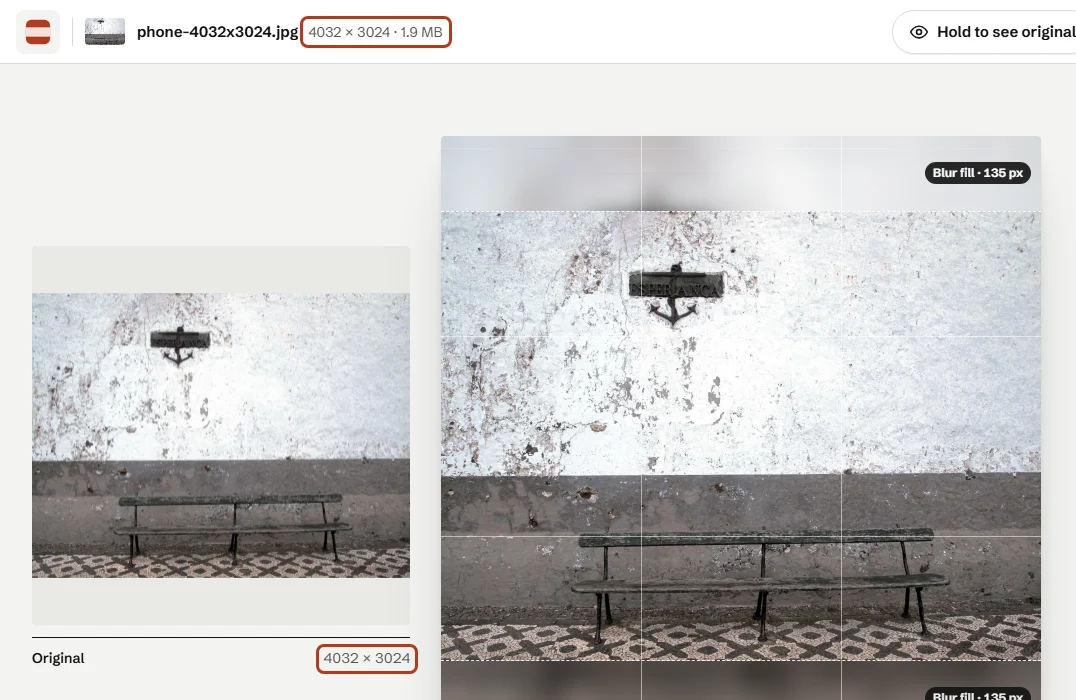
- This site's square tool: drop the photo in, and its size appears next to the file name and under Original.
How does 1:1 compare with 4:5, 4:3, 3:2 and 16:9?
A 1:1 frame sits between portrait and landscape. A 4:5 frame is slightly taller than a square, while 4:3, 3:2 and 16:9 get steadily wider.
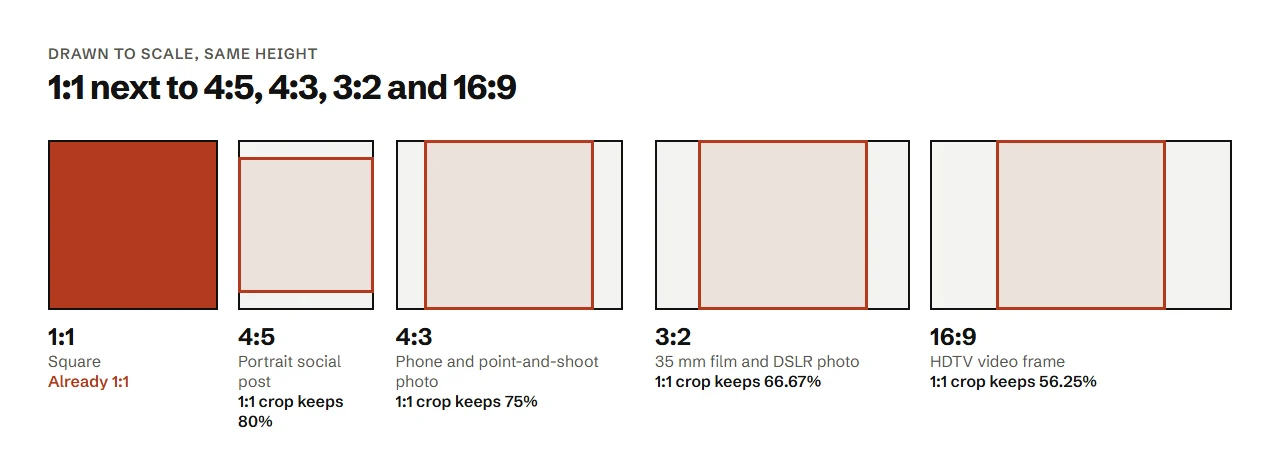
Each of the 4 other shapes has a typical source, checked on 24 November 2026:
- 4:5 portrait: a tall feed post. Instagram's Help Center keeps photos between 1.91:1 and 3:4, and 4:5 falls inside that range.
- 4:3: phone and compact camera photos. Apple's iPhone User Guide lists 1:1, 4:3 and 16:9 camera ratios; Wikipedia says most point-and-shoot cameras use 4:3.
- 3:2: 35 mm film, which measures 36 × 24 mm, and the DSLRs that grew from it, according to the same Wikipedia article.
- 16:9: high-definition television (HDTV), where Wikipedia calls it the international standard format.
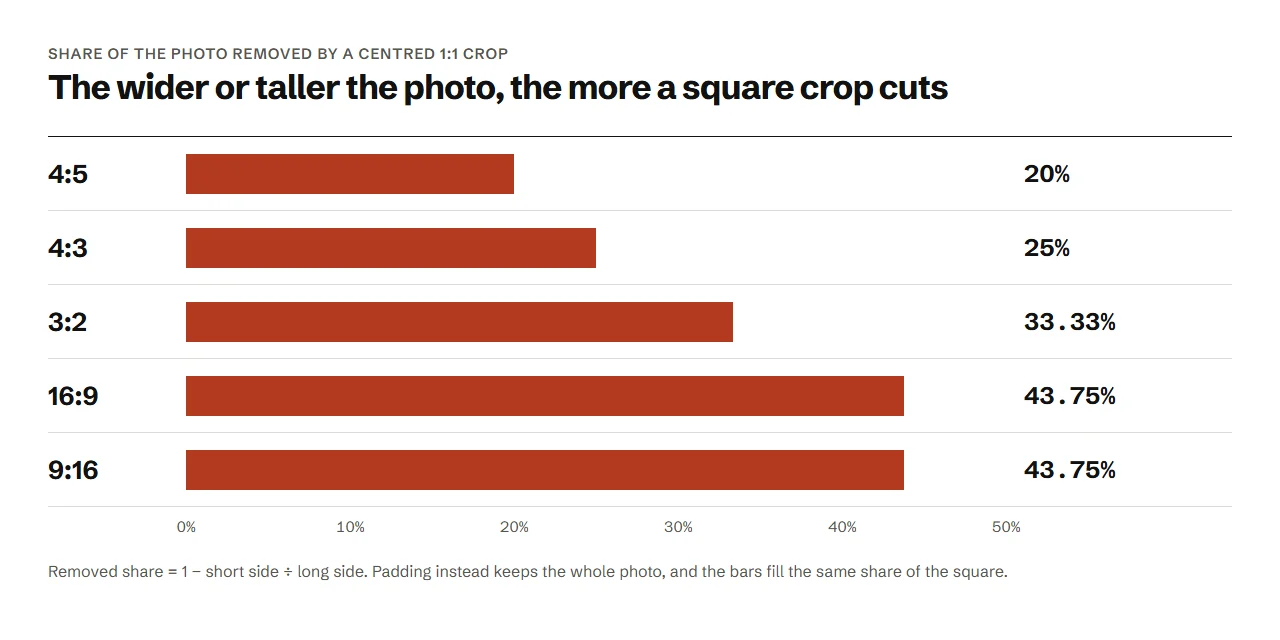
How much of a 4:3 phone photo is lost in a square crop?
A centred square crop removes 25% of a 4:3 phone photo and keeps 75%. The kept share is the short side divided by the long side: 3 ÷ 4.
kept share = short side ÷ long side
The further a photo is from square, the more a crop removes. Padding keeps 100% of the picture instead, and its bars fill the same share of the square.
| Ratio | Typical source | Crop keeps | Crop removes | Bars when padded |
|---|---|---|---|---|
| 4:3 | Phone and point-and-shoot photo | 75% | 25% | 25% of the square |
| 3:2 | 35 mm film and DSLR photo | 66.67% | 33.33% | 33.33% of the square |
| 16:9 | HDTV video frame | 56.25% | 43.75% | 43.75% of the square |
| 4:5 | Portrait social post | 80% | 20% | 20% of the square |
| 9:16 | Upright 16:9 video | 56.25% | 43.75% | 43.75% of the square |
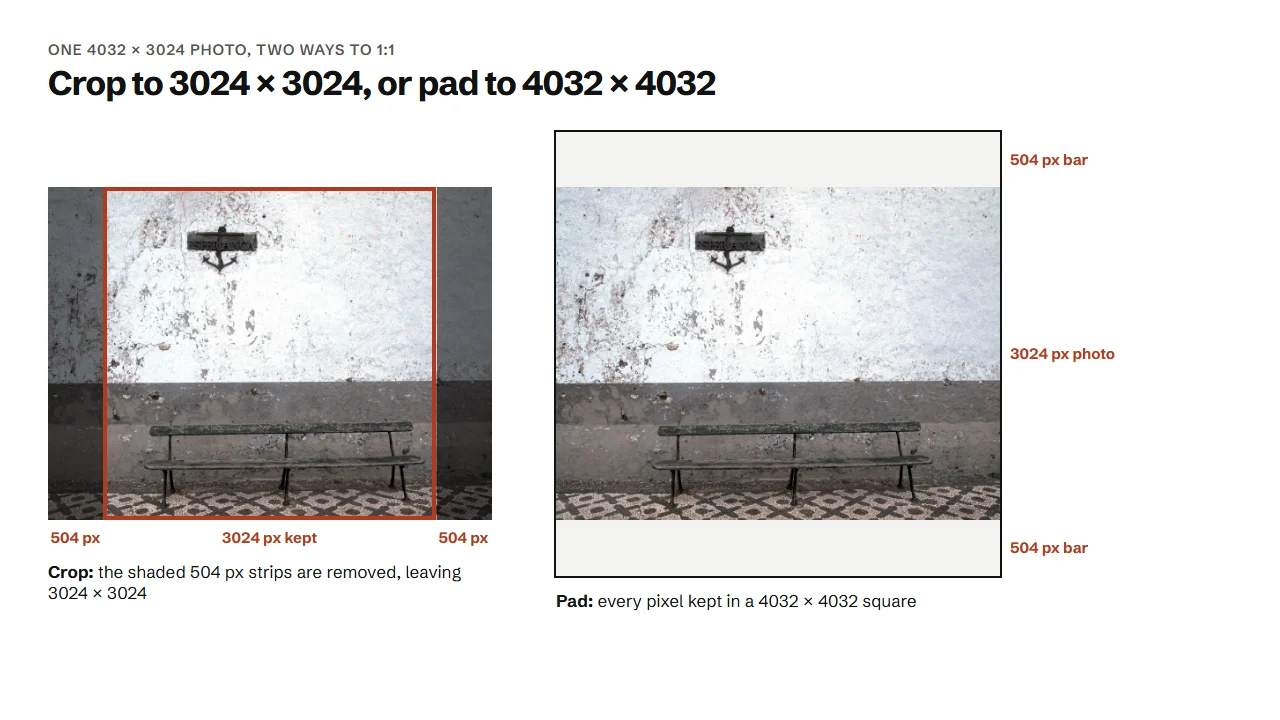
What does a 1:1 crop or pad mean in pixels?
A 4032 × 3024 photo crops to 3024 × 3024, with 504 px cut from each side. Padded, it becomes 4032 × 4032 with 504 px bars.
| Photo | Crop to 1:1 | Cut per side | Pad to 1:1 | Bar per side | Padded at 1080 px |
|---|---|---|---|---|---|
| 4032 × 3024 (4:3) | 3024 × 3024 | 504 px | 4032 × 4032 | 504 px | photo 1080 × 810, 135 px bars |
| 6000 × 4000 (3:2) | 4000 × 4000 | 1000 px | 6000 × 6000 | 1000 px | photo 1080 × 720, 180 px bars |
| 1920 × 1080 (16:9) | 1080 × 1080 | 420 px | 1920 × 1920 | 420 px | photo 1080 × 608, 236 px bars |
Scaled to a 1080 px square, a padded 4:3 photo is 1080 × 810 with 135 px bars. A padded 3:2 photo is 1080 × 720 with 180 px bars.
A centred crop may cut the subject. To choose which part stays, crop a photo to a square and drag the frame onto it.
Which resize mode should you choose for 1:1?
There are 3 ways to turn a photo into 1:1: crop, pad or stretch. Choose crop when the edges hold nothing you need, and pad when every part must stay.
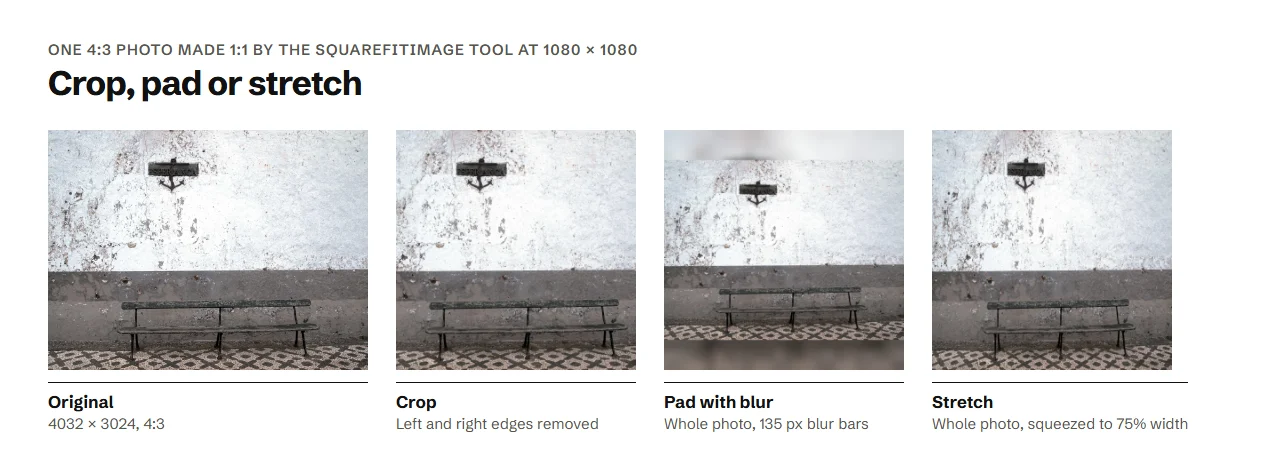
- Crop
Crop removes the strips outside a centred square. A 4:3 photo loses 25% of its area, but what stays keeps its shape and detail.
Wikipedia files this editing step under cropping (image): removing the outer parts of a picture to change its framing.
- Pad
Pad, also called fit, keeps the whole photo and fills the leftover space with a colour or a blurred copy of the photo.
The bars have two names, letterboxing and pillarboxing (padding bars): letterbox bars sit above and below, pillarbox bars at the sides.
To keep the look of the photo, pad the photo with blur. For products and prints, a white border suits better.
- Stretch
Stretch fills the square by changing the shape of everything in the photo. A 4:3 photo stretched to 1:1 is squeezed to 75% of its width.
Round things turn into ovals and faces look thin, so stretch suits textures and patterns more than people.
All three modes run in your browser on this site, and the photo is not uploaded: make any photo 1:1 here.
How to change a picture's ratio to 1:1 without cropping
To change a picture's ratio to 1:1 without cropping, pad it: place the whole photo in a square and fill the empty space. Nothing is removed or distorted.
A 4032 × 3024 photo padded at full size becomes 4032 × 4032, with 504 px bars above and below the photo.
Can you resize a widescreen image into a vertical ratio?
No, resizing alone can't turn a widescreen image into a vertical ratio without distortion. Changing only the width and height stretches everything in the picture.
Crop a tall slice from the middle, or pad the wide frame with bars. To change an image to another ratio such as 4:5 or 9:16, use the ratio changer.
What did our exports measure at 1080, 2048 and 3000 px?
Our exports matched the computed numbers in 9 of 9 fit runs. Every file had the expected size and the expected bars, to the pixel.
On 24 November 2026, we loaded 4032 × 3024, 6000 × 4000 and 1920 × 1080 images into the tool in Chromium 159 (Playwright) on a Windows 11 PC.
Each image was saved as PNG in Colour fit and Crop at 1080, 2048 or 3000 px. The fill was pure magenta, so a script could count the bar rows.
| Photo | Export | File measured | Expected bars | Measured bars |
|---|---|---|---|---|
| 4032 × 3024 | 1080 px | 1080 × 1080 | 135 / 135 px | 135 / 135 px |
| 4032 × 3024 | 2048 px | 2048 × 2048 | 256 / 256 px | 256 / 256 px |
| 4032 × 3024 | 3000 px | 3000 × 3000 | 375 / 375 px | 375 / 375 px |
| 6000 × 4000 | 1080 px | 1080 × 1080 | 180 / 180 px | 180 / 180 px |
| 6000 × 4000 | 2048 px | 2048 × 2048 | 341 / 342 px | 341 / 342 px |
| 6000 × 4000 | 3000 px | 3000 × 3000 | 500 / 500 px | 500 / 500 px |
| 1920 × 1080 | 1080 px | 1080 × 1080 | 236 / 236 px | 236 / 236 px |
| 1920 × 1080 | 2048 px | 2048 × 2048 | 448 / 448 px | 448 / 448 px |
| 1920 × 1080 | 3000 px | 3000 × 3000 | 656 / 656 px | 656 / 656 px |
Only 6000 × 4000 at 2048 px is uneven: 341 px on top, 342 px below. The photo is 1365.33 px tall there, so the spare row goes below.
The 9 crop exports were all exact squares too. Against a centred square cut from each original, the average pixel difference was at most 3.13 out of 255.
The 4032 × 3024 test image is a JPEG photo. The other two were cut from it and resized, so they test the geometry, not camera detail.
Where is the 1:1 ratio the expected shape?
The 1:1 ratio is the expected shape in 4 common places: square social posts, profile pictures, product grids and album covers.
- Square social posts: the Wikipedia aspect ratio article notes 1:1 is often seen on Instagram. To post a wide photo whole, see Instagram without cropping.
- Profile pictures: a circle drawn inside a square touches all four sides, so a square photo shown round loses only its corners. See square profile pictures.
- Product grids: a square photo fills an equal grid tile with no bars. Each shop's size is on the page of square product photo sizes.
- Album covers: Wikipedia's album cover article, read on 24 November 2026, gives a typical LP sleeve as 12.375 in (31.43 cm) square and a CD cover as about 4.75 in (12.1 cm).
Make a photo 1:1
Crop, pad with blur or a colour, or stretch. The square is made on your device at 1080, 2048 or 3000 px or a custom size.